Analyzing the Impact of Dynamic Ads on CLS and Optimization Strategies
The recently detected Cumulative Layout Shift (CLS) phenomenon on blogs has a significant impact on website user experience and Search Engine Optimization (SEO). This article provides a deep dive into the causes of CLS issues stemming from dynamic ads and image loading, offering specific optimization methods to improve CLS scores and pass Core Web Vitals by configuring ad placements and reserved areas.
The Impact of CLS Optimization on SEO and Layout Shift Phenomena
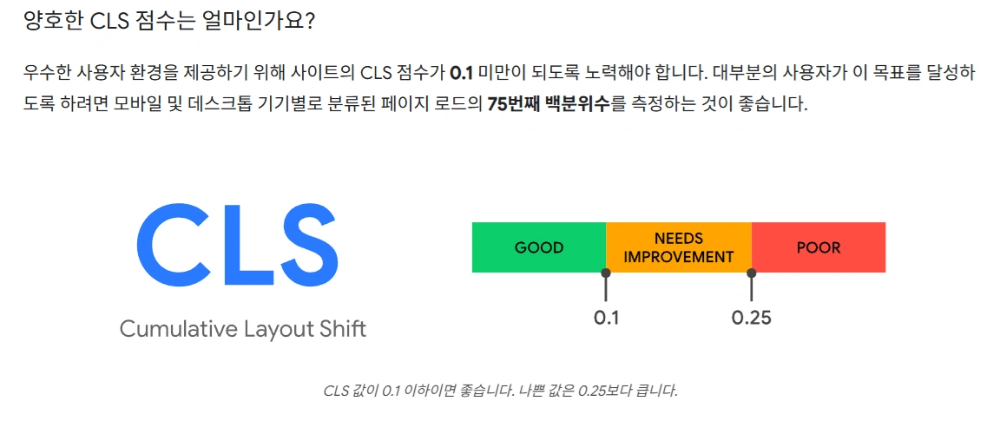
CLS refers to unexpected layout shifts that occur while a user explores a web page. This is a phenomenon where content moves as the page initially loads. A higher CLS value negatively impacts the user experience and is treated as a core element in Search Engine Optimization.
If the CLS score deviates beyond the acceptable threshold, it is a critical issue to the point where achieving high search rankings might become impossible. Major search engines, including Naver and Google, use CLS as a key metric for measuring page quality.
Identifying CLS Layout Shift Elements and Diagnosing Causes
Analyzing recent CLS issues on the blog confirmed that problems were occurring with images located directly below the top menu. These images shifted slightly after the page loaded, affecting the layout and increasing the CLS value.
To resolve this, I inspected and modified top-level elements, including images, one by one. Common causes of CLS are as follows:
| Primary Causes of CLS | Technical Solutions (Long-tail Keywords) |
|---|---|
| Lazy loading of dynamic ads or widgets | Reserve Height/Width using CSS for ad slots (Size specification) |
| Images loading without specified dimensions | Specify width and height attributes in HTML tags |
| Web font loading (FOIT/FOUT) | Use font-display: swap and preloading fonts |
The Impact of Minor CLS Fluctuations
In the case of my blog, the CLS value showed a relatively small movement of 0.006. This figure is much lower than the CLS passing threshold of 0.1, meaning it does not cause major issues for the user experience. However, even such minor fluctuations can subtly affect SEO performance, so it is important to identify and resolve problems in advance. Page performance optimization is a process of incremental improvement.
Priority for Fixing CLS Issue Elements
It is crucial to understand why a layout shift occurred. The top priority (Priority 0) for suspicion should be the element that moved. Next, inspect the elements placed at the top of the page. Check elements from index 0 to 6 one by one and fix any problematic parts. Shifts in the top layout are detected first by users and have a major impact on the CLS score.
How to Optimize CLS Layout Shifts Caused by Dynamic Ads
Analysis of Dynamic Ad Impact
Dynamic ads are added randomly after the overall layout is formed when a user accesses a web page, which can cause layout shifts (CLS values).
✔ Example: The position of the post content moves downward by the size of the ad as the ad loads.
✔ Example of CLS figures when ads are displayed automatically: Even with these figures, it is possible to pass Core Web Vitals metrics.
The reason sites can pass Core Web Vital tests without specific CLS optimization is that automated ads often alternate between top and bottom placements, reducing overall negative CLS scores. You only need to pass 7 out of 10 tests.
In other words,
To reduce the possibility of CLS issues when ads are continuously displayed at the top, automated ads are also set to appear randomly at both the top and bottom.
Solving CLS Optimization Issues: Reserving Ad Space
The CLS problem caused by ads can be easily solved by pre-selecting the ad location and reserving space for it.
Simply set the ad position and reserved area.
The core of CLS optimization is to reserve space using CSS min-height, height, and width attributes for the area where the ad will be displayed. This ensures that even if the ad loads late, the space is already secured, and no content shift occurs.
By performing CLS optimization,
exposing many ads will no longer cause any performance issues.
In search optimization, CLS issues can be both simple and complex. However, the important thing is that they must never be ignored. Improving the user experience directly leads to enhanced SEO performance.
Q: How is the CLS layout shift threshold of 0.1 measured?
A: CLS is calculated by multiplying the Impact Fraction by the Distance Fraction. The Impact Fraction is the proportion of the viewport area affected by the layout shift, and the Distance Fraction is the maximum distance an affected element has moved. A CLS value of less than 0.1 is considered 'Good'.
Q: When reserving space for dynamic ads, do I need to consider all possible sizes?
A: Yes. If an ad slot supports multiple ad sizes, you should reserve space based on the largest possible ad size to completely prevent layout shifts. Using CSS media queries to set the optimal height for mobile and desktop environments is key to ad-related CLS optimization.
Q: After resolving CLS issues, how long does it take for the results to reflect in Naver or Google Webmaster tools?
A: CLS is measured through field data (real user data) and lab data (e.g., PageSpeed Insights). Lab data reflects improvements immediately, but it typically takes about 28 days for search engines to update field data (Core Web Vitals). Consistent monitoring is crucial for passing Core Web Vitals.