Optimizing Web Page Load Speed for Effective SEO Improvement
The web page loading process is a core element of Search Engine Optimization (SEO). This article covers the stages of web page loadingfrom DNS lookup to DOM creation, render tree construction, and final displayand provides specific web performance optimization methods (dns-prefetch, preconnect, CSS, and JavaScript optimization) that operators can apply. This information is essential for improving Core Web Vitals (LCP, INP, CLS) metrics.
Analyzing Web Page Loading Stages and Bottlenecks for Enhanced SEO
The web page loading process is a vital factor in search optimization. Loading begins with a DNS lookup to obtain an IP address, followed by establishing a connection with the server via TCP. Through HTTP requests, the browser receives HTML and CSS to create the DOM and Render Tree. Styles are applied via CSS, and JavaScript is executed to add dynamic content. Afterward, the layout is calculated, and the page is finally displayed on the screen through painting and compositing.
For effective SEO work, having a basic understanding of how a web page loads makes the task much easier. It is important to identify which parts of each stage an operator can optimize and focus on those specific areas, as manual intervention is often limited to certain parts of the loading cycle.
Issues arising from other factors after initial SEO must be identified through subsequent audits. To help you understand which part of the process these issues occur in, I have summarized the step-by-step explanations of web page loading below.
Web Page Loading Sequence and Core Web Vitals Optimization
1. DNS Lookup and Resource Pre-connection (Improving TTFB)
DNS lookup is the process where the browser converts a domain name into an IP address when a user enters a website URL. Essentially, it translates a human-friendly site name into a number that a computer can understand. When a request is sent to the DNS (Domain Name System), the server returns the corresponding IP address. If cache information exists in the browser, this lookup process can be skipped.
Loading multiple resources from various external sites can cause a bottleneck. By preparing connections in advance for sites from which you frequently pull information, you can load external resources faster.
dns-prefetch allows the browser to perform DNS lookups for a domain name in the background to cache the IP address.
preconnect instructs the browser to establish a connection to an external domain ahead of time.
✔ Example (Optimization via external resource pre-connection):
link rel="preconnect" href="https://fonts.googleapis.com"
link rel="dns-prefetch" href="https://fonts.gstatic.com"
This technique is effective for reducing Time To First Byte (TTFB) and improving Largest Contentful Paint (LCP), particularly for resources like Google Fonts or external CDNs.
2. TCP Handshake, 3. HTTP Request, and 4. Server Response
The browser uses the IP address obtained from the DNS lookup to establish a TCP connection with the web server. During this stage, controls such as data transfer speed, packet loss, and error handling are managed. Once connected, an HTTP request is sent, and the server processes it to send back a response containing HTML code, status codes, and header information. These initial stages directly impact TTFB; a faster TTFB leads to better overall loading performance. Server-side optimization (CDN, caching, reducing server response time) is essential here.
5. HTML Parsing and DOM Tree Creation
The browser reads and analyzes the HTML code to construct the Document Object Model (DOM) tree. The DOM tree represents the structure of the HTML document. When external resources (CSS, JavaScript) are discovered during this process, the browser requests them. If a Render-Blocking Resource is encountered, the parsing process may be paused.
6. CSS Processing and CSSOM Creation
Once the structure is formed, CSS files are read to define the styles of the HTML document. The browser parses the CSS to create the CSS Object Model (CSSOM) tree. Since CSS is a render-blocking resource, small amounts of critical CSS should be inlined within the HTML (Critical CSS), while the rest should be loaded asynchronously to improve First Contentful Paint (FCP).
7. JavaScript Execution and Interaction Responsiveness
The browser parses and executes JavaScript included in the HTML. JavaScript can modify the DOM and CSSOM, causing page content or styles to change dynamically. JavaScript execution occupies the main thread, which can delay the page's response to user input. This directly affects Interaction to Next Paint (INP) and Total Blocking Time (TBT). Unnecessary scripts should be loaded asynchronously using defer or async attributes, and code should be minified to shorten execution time.
8. Render Tree Creation and 9. Layout Calculation (Reflow)
The browser combines the DOM and CSSOM to create a Render Tree, which contains only the information for elements that will actually be drawn on the screen. Based on this tree, the browser calculates the exact position and size of each elementa process known as Layout or Reflow.
In SEO, the CLS metric, which is the most critical measurement, is most often affected at this stage. To minimize unexpected layout shifts, you must specify width and height for images or reserve space for ad areas to prevent Cumulative Layout Shift (CLS).
Block Elements: Occupy the full width by default and start on a new line.
Inline Elements: Fit the width of the content and do not start on a new line.
9. Painting and 11. Compositing
The browser draws each element on the screen, rendering colors, text, and images. Compositing is the final stage where each rendered element is combined to be displayed. For complex layouts, the browser processes pages composed of multiple layers, where each layer is rendered independently and merged before being shown on the screen.
10. Page Load Completion (Load Event)
This is the point where all resources are loaded, JavaScript has finished executing, the page is fully rendered, and the browser marks the page loading as complete.
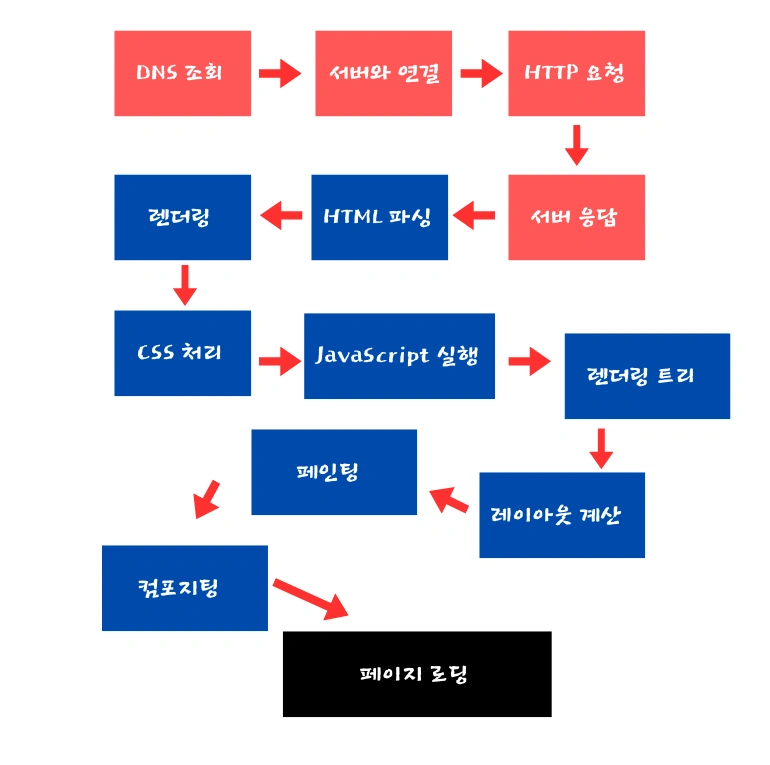
Core Web Vitals Metrics and Correlation with Loading Stages
Core Web Vitals, as defined by Google, are key metrics for measuring user experience and are closely related to each stage of web page loading. The table below summarizes the major metrics and their corresponding loading stages.
| Core Web Vital Metric | What it Measures | Good Threshold | Primary Loading Stages | Core Optimization Strategy |
|---|---|---|---|---|
| LCP (Largest Contentful Paint) |
Loading performance (Time to display the largest content) | Under 2.5s | Stages 16 (Server response, images, CSS blocking) | Reduce TTFB, Inline Critical CSS, Preload resources |
| INP (Interaction to Next Paint) |
Interactivity and responsiveness (Delay after user input) | Under 200ms | Stage 7 (JavaScript execution) | Minify/Split JS, Reduce main thread occupancy |
| CLS (Cumulative Layout Shift) |
Visual stability (Unexpected layout movements) | Under 0.1 | Stage 9 (Layout calculation) | Specify dimensions for images/ads, Control font loading |
Q: Does inlining Critical CSS really help improve speed?
A: Yes, it is very effective. Critical CSS is the minimum amount of CSS required to render the "above-the-fold" content. By inlining this CSS within the HTML file, you save the time the browser would spend requesting and downloading an external CSS file, thereby shortening CSSOM creation time and accelerating First Contentful Paint (FCP).
Q: How do the defer and async attributes affect JavaScript loading differently?
A: Both attributes download JavaScript asynchronously to prevent blocking HTML parsing. However, async scripts execute as soon as the download is complete, meaning execution order is not guaranteed. defer scripts execute in the order they appear in the document only after HTML parsing is finished (just before DOMContentLoaded). Generally, use async for independent scripts and defer for scripts that depend on the DOM or other scripts.
Q: Which stage has the greatest impact on CLS, and how can it be prevented?
A: The stages with the most impact on Cumulative Layout Shift (CLS) are 9. Layout Calculation and 7. JavaScript Execution. Often, resources like images, ads, or fonts appear late without reserved space, pushing other content around. To prevent this, always specify width and height for images/ads to reserve space and use font-display: swap when loading web fonts.