Reducing Page Load Time with Strategic Image Usage: LCP Optimization
This is a detailed SEO guide focused on improving LCP (Largest Contentful Paint) speed, a key Core Web Vital. Learn how to drastically reduce loading times and enhance user experience through LCP definitions, image creation and compression for mobile/PC, and technical coding methods like assigning image loading priorities.
Strategies for Using Images to Improve LCP Speed
In Search Engine Optimization (SEO), targeting images for LCP speed improvement is one of the most effective methods. Largest Contentful Paint (LCP) measures the time it takes for the largest content element in the viewport to appear on the screen during page load. Since this is a critical factor in search engine ranking, optimizing images directly impacts your Core Web Vitals score.
LCP Definition and the Benefits of Image Utilization
LCP (Largest Contentful Paint): The time it takes for the largest content (image, text block, etc.) within the viewport to render. Aiming for under 2.5 seconds is recommended for SEO.
The Necessity and Benefits of Image Targeting
- Image Targeting: A method of intentionally optimizing the largest content elementusually an imageto boost LCP speed.
- Text vs. Image: Images are often more effective for design than text and help avoid FOUC (Flash of Unstyled Content) issues caused by delayed web font loading.
- Improved User Experience (UX): Rapidly displaying critical images on the first screen reduces bounce rates.
Image Settings and Detailed Production for LCP Optimization
Successful LCP optimization requires more than just inserting an image; it involves fine-tuning various factors such as file format, size, and loading methods. This Image SEO optimization minimizes loading delays.
Image Configuration and Best Practices
- Set Manageable Targets: Focus on elements that you, the operator, can directly code and manage for the most efficient optimization.
- Continuous Monitoring: It is vital to consistently check and adjust LCP performance using tools like PageSpeed Insights even after initial optimization.
- Format Conversion: Replace JPG or PNG files with next-generation formats like WebP to drastically reduce file sizes.
- Compression and Size Optimization: Compress file sizes while maintaining quality and ensure images are sized correctly (responsive sizes).
- Responsive Image Creation: Create separate images for mobile and desktop to prevent unnecessary data transfer.
- Viewport Compliance: Image dimensions should not exceed the viewport. Exceeding the viewport can confuse LCP calculations or delay loading.
- Preloading and Priority Assignment: Use the fetchpriority attribute to elevate the loading priority of your LCP target image.
Detailed LCP Optimization: Responsive Design and File Formats
Creating Responsive Images for Mobile and PC
Image production should involve two versionsmobile and PCto optimize for responsive web environments. Each size must be set appropriately to ensure they are neither too small nor too large.
If an image is too small, the LCP target may shift to another element. Conversely, excessively large images can negatively impact other performance metrics. Generally, it is recommended to keep mobile images within 300px width and 100px height, and PC images within 500px width and 200px height. These are guidelines, not absolute rules, and should be adjusted based on your layout and design.
Reducing File Size via Web-Ready Conversion and Compression
Completed images should be converted to web-optimized formats like WebP. If your workflow already produces web-optimized files, you may skip this step. Additionally, efficient compression is key. While large files benefit greatly from compression, smaller files should aim to maintain their original quality.
Once the image is ready, its placement is crucial. To contribute to Search Engine Optimization, the image must be placed within the initial viewport. While it can be placed anywhere (top, side, bottom), exposure on the first loading screen is most effective.
Image Coding and Preloading for Maximum Speed
Image Coding: Utilizing the picture Tag and Priority Hints
Finally, when coding images for SEO, use the picture tag to implement responsive images and assign preloading priorities. This instructs the browser to load critical assets faster. Key attributes for loading speed include preload and fetchpriority.
After converting to WebP, implement the picture tag as shown in the example below:
div class="image-ad-container"
picture
 !-- Mobile Image --
 source
 srcset="https://tistory1.daumcdn.net/tistory/6933373/skin/images/52585554.webp"
 media="(max-width: 767px)"
 width="300"
 height="56"
 /
 !-- Desktop Image --
 source
 srcset="https://tistory1.daumcdn.net/tistory/6933373/skin/images/52585554-1.webp"
 media="(min-width: 768px)"
 width="500"
 height="189"
 /
 !-- Fallback Image --
 img
 src="https://tistory1.daumcdn.net/tistory/6933373/skin/images/52585554.webp"
 alt="Image for LCP Optimization"
 class="responsive-image"
 loading="eager"
 fetchpriority="high"
 width="500"
 height="189"
 /
/picture
/div
Preloading in the HEAD Section
Place this code at the top of your post or directly under the title to ensure it appears in the viewport. Additionally, you must request the browser to preload the image in the HEAD section. This ensures the LCP element is fetched before the browser begins rendering, shortening the overall time. Use the following code:
!-- Preload first image (Mobile) --
link rel="preload" fetchpriority="high" href="https://tistory1.daumcdn.net/tistory/6933373/skin/images/52585554.webp" as="image" type="image/webp" /

!-- Preload second image (PC) --
link rel="preload" fetchpriority="high" href="https://tistory1.daumcdn.net/tistory/6933373/skin/images/52585554-1.webp" as="image" type="image/webp" /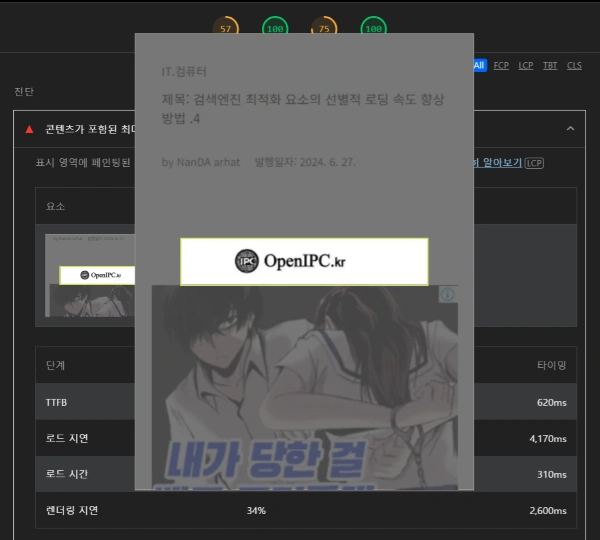
Once your created image is correctly identified as the LCP target, the first stage of optimization is complete. While this alone won't solve everything, improving LCP speed requires this level of targeted control. By designating manageable targets, you can maintain optimization without needing to overhaul the entire system's codebase, which is often impossible on platforms where you don't control the full backend.
Q1. Is WebP conversion mandatory for LCP optimization?
A: WebP is the most recommended format for LCP optimization due to its superior compression. However, for full compatibility, the best practice is to use the picture tag to provide JPEG/PNG fallbacks for older browsers that do not support WebP.
Q2. Is using an image as an LCP target always better than using text?
A: If the image itself is too heavy, it can delay LCP. However, text often suffers from "FOIT" (Flash of Invisible Text) or font loading delays. A properly compressed and preloaded image can render faster than web fonts, making it a highly effective target for LCP optimization.
Q3. Why should I use loading="eager" and fetchpriority="high" together?
A: While loading="eager" tells the browser to load the image immediately, fetchpriority="high" provides a stronger hint that this specific resource should be fetched before other competing resources. Combining these with a link rel="preload" in the HEAD ensures the fastest possible rendering for your LCP element.