How to Instantly Reflect Website Content Changes Using IndexNow
Learn how to use IndexNow to quickly notify search engines of changes to your website content. We provide methods for issuing and hosting IndexNow API keys, submitting URLs in JSON format, and applying scripts for automated indexing requests using RSS feeds. Use IndexNow to reflect changes in search results rapidly and increase your SEO optimization efficiency!
Introduction to IndexNow and Its Role in Search Engine Optimization (SEO)
IndexNow is an open standard protocol that allows you to quickly notify participating search engines like Google, Bing, and Yandex of website content changes (new posts, edits, or deletions). Previously, you had to wait for search engine crawlers to visit your site, but by applying the IndexNow method, you can instantly reflect website content changes by submitting URLs directly to search engines. This helps your content appear quickly in search results, providing a significant boost to SEO optimization and allowing for more efficient use of your crawl budget.
In particular, you can automatically submit URLs using an API key, which increases management efficiency. Additionally, you can automatically notify engines of the latest content via RSS feeds. IndexNow is one of the most effective tools for making rapid indexing requests for your website.
IndexNow API Key Issuance and Manual URL Submission Procedures
To use IndexNow, you need to issue an API key and go through the process of submitting URLs using that key. It is common to issue and manage keys through Bing Webmaster Tools.
1. Sign up for Bing Webmaster Tools and Register Your Site
- Visit the Bing Webmaster Tools website and log in with a Microsoft account. (Create a new one if you don't have one.)
- After logging in, click "Add a Site" on the dashboard and enter your website URL.
- Complete the site ownership verification process (uploading an HTML file, adding meta tags, or adding a DNS record).
Official IndexNow Website: IndexNow | Bing Webmaster Tools
2. How to Issue an IndexNow API Key
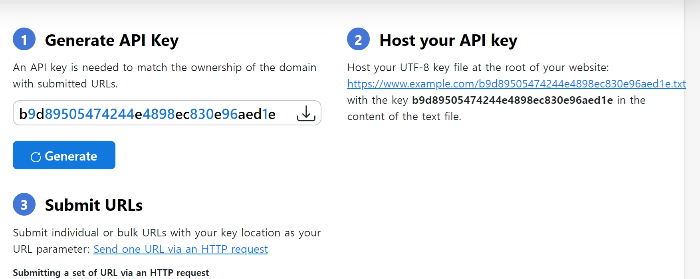
API Key Generation and Hosting
- Find the "IndexNow" section on your site dashboard to generate an API key.
- Copy the generated API key and save it in a secure place. API keys are unique to each site, so be careful with security.
- You must host the generated API key as a UTF-8 formatted text file in the root directory of your website. The filename is designated to be the same as the API key value.
- Example path: Include the API key as the file content at
https://www.example.com/b9d89505474244e4898ec830e96aed1e.txt.
Note: The API key file must be hosted in the root directory for the IndexNow server to verify ownership.
3. URL Submission (JSON POST Request)
To submit URLs, send an HTTP POST request in JSON format to the IndexNow endpoint (https://api.indexnow.org/indexnow). This request allows you to submit multiple URLs at once for rapid URL indexing requests.
{
 "host": "www.example.org",
 "key": "b9d89505474244e4898ec830e96aed1e",
 "keyLocation": "https://www.example.org/b9d89505474244e4898ec830e96aed1e.txt",
 "urlList": [
 "https://www.example.org/url1",
 "https://www.example.org/folder/url2",
 "https://www.example.org/url3"
 ]
}
4. HTTP Response and Status Monitoring
After the request, the server returns various HTTP response codes indicating the URL submission status.
- 200 (OK): URL submission successful (the most common success response).
- 400 (Bad Request): Request format error (check JSON format, missing required fields, etc.).
- 403 (Forbidden): Invalid API key or key file inaccessible.
- 422 (Unprocessable Entity): The submitted URL does not belong to the host, or the key does not match.
- 429 (Too Many Requests): Daily request limit exceeded (request frequency needs adjustment).
You can use Bing Webmaster Tools to periodically monitor whether submitted URLs have been correctly delivered to search engines to verify the success of your indexing requests.
Integrating RSS Feeds and Utilizing Scripts for Automation
IndexNow can also be implemented using a script that automatically detects page changes via RSS feeds and requests URL submission. This method significantly improves website management efficiency.
Auto-Submission Script (RSS Integration)
The JavaScript script below fetches the latest URL list from an RSS feed when a web page loads and submits it to the IndexNow API. To prevent duplicate requests, it is designed to run only once a day using local storage. You can build automation by inserting this code into the head tag of your website's HTML or another appropriate location.
- Utilizes local storage to ensure URL submission runs only once a day when the page loads. This method prevents unnecessary duplicate requests and ensures efficient URL submission.
- You must accurately modify the API key, key file URL, host, and RSS feed URL with your own information.
async function fetchRssUrls(rssUrl) {
const response = await fetch(rssUrl);
const text = await response.text();
const parser = new DOMParser();
const xmlDoc = parser.parseFromString(text, "application/xml");

// Parsing link tags or item links according to the RSS/Atom feed structure
const urls = Array.from(xmlDoc.getElementsByTagName("link")).map(link = link.textContent);
return urls;
}

async function submitUrlsToIndexNow(rssUrl) {
const apiKey = 'b9d89505474244e4898ec830e96aed1e';
const keyLocation = 'https://www.example.com/b9d89505474244e4898ec830e96aed1e.txt'; // URL of the hosted key file
const host = 'www.example.com'; // Your domain

// Fetching URLs from the RSS feed
const urls = await fetchRssUrls(rssUrl);

const requestBody = {
host: host,
key: apiKey,
keyLocation: keyLocation,
urlList: urls
};

try {
const response = await fetch('https://api.indexnow.org/indexnow', {
method: 'POST',
headers: {
'Content-Type': 'application/json; charset=utf-8'
},
body: JSON.stringify(requestBody)
});

const result = await response.json();
if (response.ok) {
console.log('URLs submitted successfully:', result);
} else {
console.error('Error submitting URLs:', result);
}
} catch (error) {
console.error('Fetch error:', error);
}
}

function shouldRunOnceADay() {
const lastRun = localStorage.getItem('lastIndexNowRun');
const now = Date.now();

// Milliseconds in one day (24 hours)
const oneDay = 24 * 60 * 60 * 1000;

if (!lastRun || (now - lastRun) oneDay) {
localStorage.setItem('lastIndexNowRun', now);
return true;
}
return false;
}

// Execute on page load
window.addEventListener('load', () = {
const rssFeedUrl = 'https://example.com/rss'; // RSS feed URL

if (shouldRunOnceADay()) {
submitUrlsToIndexNow(rssFeedUrl);
} else {
console.log('Already executed today.');
}
});
By following these procedures, you can effectively utilize IndexNow to promptly submit website URLs to search engines and improve your SEO performance.
Note: IndexNow does not support all web hosting environments. In particular, some blog services (e.g., Tistory) may not allow its use due to restrictions on direct API key hosting and server-side script execution. You must check your hosting environment before use.
Q1. Is IndexNow valid for Google as well?
A1. Yes, while IndexNow started as a protocol from Bing, several major search engines, including Google, currently support this protocol. Therefore, URLs submitted via the IndexNow API can expect rapid indexing reflection in Google search results as well. This helps increase the exposure speed of all content, including long-tail keywords.
Q2. Is it safe to directly expose the IndexNow API key?
A2. Since the IndexNow API key must be hosted as a file in the root directory of the website, it is difficult to hide it completely. However, this key is only used for URL submission purposes, and the system is restricted so that only URLs from the website where the key was issued can be submitted. Therefore, even if someone else knows the key, they cannot use it to request indexing for other sites, so the security risk is relatively low. Nonetheless, it is important to prevent unauthorized changes to the key file.
Q3. Does using IndexNow make existing Sitemap submissions unnecessary?
A3. No, it doesn't. While IndexNow focuses on the immediate reflection of content changes, a Sitemap serves to provide the entire structure and a list of all URLs of a website to search engines. IndexNow and Sitemaps have a complementary relationship, and it is recommended to use both as part of your search engine optimization strategy.