Improving Website Performance via Font Optimization: Solving LCP and CLS Issues for Better Search Visibility
Discover how to solve LCP (Largest Contentful Paint) and CLS (Cumulative Layout Shift) issues through font optimization to enhance search engine performance. Check out specific optimization tips such as applying WOFF2, inline CSS loading, and `font-display` settings.
Analyzing LCP and CLS Issues: Font Loading Speed and Layout Stability
Font optimization is a crucial factor in improving page loading speed and layout stability. If fonts load slowly, text rendering is delayed, which negatively impacts Largest Contentful Paint (LCP) and Cumulative Layout Shift (CLS). This is a major reason for low Google Core Web Vitals scores.
Among SEO techniques, font optimization is essential for improving web performance. The key to solving LCP and CLS issues lies in making fonts load faster and minimizing layout shifts caused by font changes.
5 Technical Tips for Optimizing Font Loading Speed
There are various ways to perform SEO through font optimization, but the most important aspect is handling font files efficiently during the initial loading stage. Here are the core technologies for improving font loading speed.
1. Improving Initial Loading with Inline CSS (LCP Optimization)
To load fonts as quickly as possible, include the CSS that defines the fonts directly within the HTML (inline). By including critical CSS in the internal HTML code, the browser recognizes fonts immediately without waiting for external files. This is highly effective in reducing LCP delay.
✔ Example
style
@font-face {
 font-family: 'Noto Sans KR';
 font-style: normal;
 src: url(font-path/NotoSans-Regular.woff2) format('woff2');
 unicode-range: U+AC00-D7AF, U+0030-0039, U+0041-005A, U+0061-007A, U+0020-007E;
}

html {
 font-family: 'Noto Sans KR', sans-serif;
}
/style
2. Pre-connecting to External Font Sites (Using Preconnect)
When loading fonts from an external source, you can optimize load speed by using "Preconnect" for the external site's address. This allows the browser to complete DNS lookups, TCP handshakes, and TLS negotiations in advance, reducing request latency.
✔ Example
head
 link rel="preconnect" href="https://fonts.com"
/head
3. Using Self-Hosted and System Fonts
Using default (system) fonts or hosting fonts on your own server eliminates the need to download fonts from third-party sites. Self-hosting font files increases performance control by reducing dependency on external CDNs.
✔ Example
font-family: system-ui;4. Minimizing File Size with WOFF2
For font optimization, use WOFF2 fonts, which offer 30% better compression than standard formats, to save download time. Since WOFF2 is supported by most modern browsers, making it your primary format is highly effective for page speed.
Using UNICODE-RANGE for Necessary Characters Only (Subsetting)
You can reduce font loading time by applying only specific font codes for the characters you actually use, rather than loading the entire character set. This is a subsetting technique that drastically reduces font file size, which is especially essential for Korean fonts due to their large size.
✔ Example
unicode-range:
 U+AC00-D7AF, /* Korean Syllables */
 U+0030-0039, /* Numbers 0-9 */
 U+0041-005A, /* Uppercase A-Z */
 U+0061-007A, /* Lowercase a-z */
 U+0020-007E; /* Basic Latin and Symbols */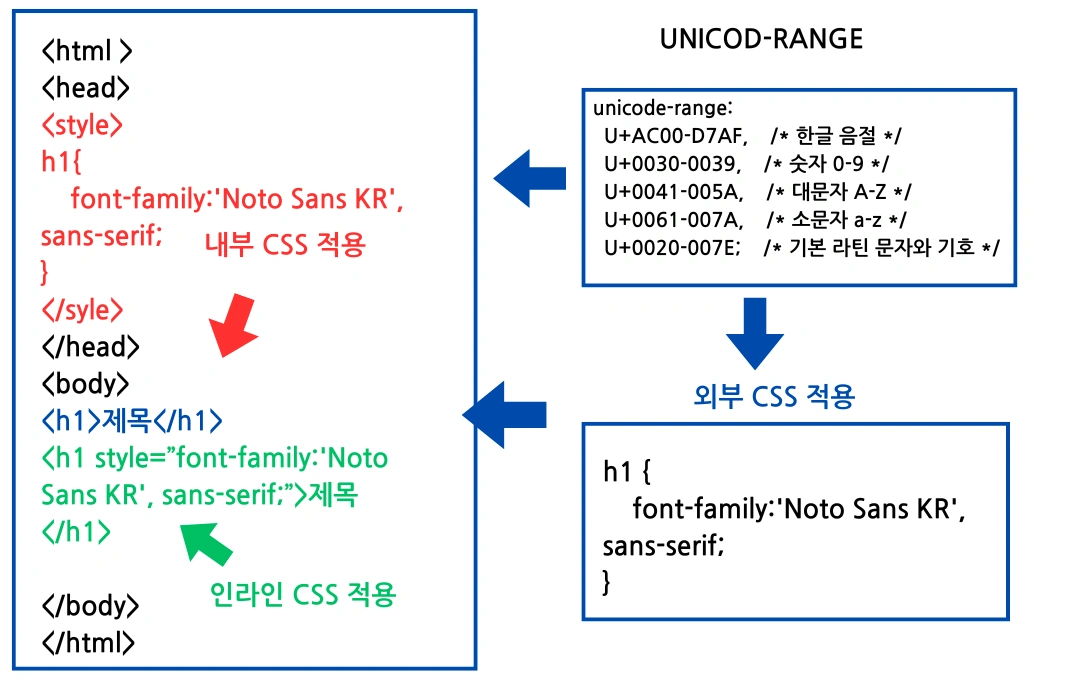
Solving CLS Issues: Preventing Font Rendering and Layout Shifts
Cumulative Layout Shift (CLS) is primarily caused by FOIT/FOUT (Flash of Invisible/Unstyled Text) when a default font is swapped for a web font, changing text size or line spacing. Here is how to prevent this:
1. Controlling Font Rendering (Using `font-display`)
Normally, browsers wait about 3 seconds for a font to load. You can reduce this waiting time by controlling how the font is displayed until it finishes loading, thereby minimizing CLS.
✔ Example: `font-display: swap;` /* Use default font, then swap when web font loads */
* auto: Browser default.
* block: Hide text until font loads (FOIT).
* swap: Show default font, then swap (FOUT, may cause CLS).
* fallback: Show default font, don't swap if it takes too long.
* optional: Only use web font if it loads very quickly (Most stable).
`DISPLAY:BLOCK` minimizes layout changes during loading, while `DISPLAY:OPTIONAL` can improve page load speed. Choose the setting that matches your website's priorities.
2. Preventing Layout Shifts During Font Changes (Using `font-size-adjust`)
You can use font-size-adjust to minimize layout shifts when fonts change. This property adjusts the x-height ratio between the web font and the system font so their sizes appear visually similar. In other words, you adjust the font size to reduce CLS.
✔ Example
font-size-adjust: 0.5; /* Adjust x-height ratio to 0.5 */Through these methods, you can optimize fonts as part of your overall SEO strategy. Since text often occupies more than 80% of a post, font optimization has a significantly positive effect on overall page performance.
Q: What else affects LCP and CLS besides font optimization?
A: LCP is affected by the rendering time of the largest elements on the page, such as images or videos. CLS is heavily influenced by images or ad banners without specified dimensions, causing the layout to jump when they load.
Q: What happens to WOFF2 fonts in older browsers?
A: You should use a prioritized `@font-face` declaration with multiple `format()` types. The browser will attempt to load the newest format (WOFF2) first and fall back to WOFF or TTF if the primary format is not supported.
Q: Since `font-display: swap;` can cause CLS, what is the alternative?
A: `swap` allows FOUT and may trigger CLS. The safest alternative is `font-display: optional;`. This setting applies the web font only if it loads extremely fast; otherwise, it keeps the default font, completely preventing layout shifts caused by font swapping.
--- Would you like me to help you identify the specific unicode-range values for a different language or a specific set of symbols?