Photography, Illustration, Design Blog: Overcoming Search Disadvantages and Image SEO Structured Data Strategy
We devise an SEO strategy for image-centric creative blogs (photography, illustration, design) to overcome disadvantages in text search and secure competitiveness in image search.
Includes utilization of JSON-LD-based Image Structured Data (ImageObject) to maximize copyright protection and search exposure, explanation of key fields (license, creator), and practical tips for dynamically inserting meta tags into creative images using JavaScript on platforms like Tistory.
Image-centric creative blogs featuring photography, illustration, and design provide visually excellent content but surprisingly face relative disadvantages in search engine text searches. The reason is that the image itself is not directly subject to text search, and if the description or metadata for the image is insufficient, search engines may not properly recognize its value.
Therefore, moving beyond simple creative image posting, Image Search Optimization and providing structured image metadata are paramount. Major search engines like Google, Naver, and Bing now actively utilize image-related structured data to understand image copyright, source, and usage terms, providing more accurate results to users.
Structured Data Utilization for Image Copyright Protection and Search Exposure
This article provides a detailed guide to the core strategies and JSON-LD-based image metadata utilization methods that help image creative blogs overcome disadvantages in search and secure a strong competitive edge in image search.
1. Why is Image Structured Data Important?
Information on a website is basically written with HTML tags, but search engines find it difficult to fully understand the meaning using only these tags. Hence, a separate standardized format called Image Structured Data is used to clarify the meaning of the content.
Structured data is a data format that is easy for search engines to read and interpret, primarily written in JSON-LD, Microdata, or RDFa. Image structured data is metadata that clearly informs the details of an image included on a webpage. For example, it specifies what the image is, who created it, who holds the copyright, and under what license it can be used.
2. Search Engines Judge Image Credibility with Metadata.
- From a search engine's perspective, an image is a resource that cannot be 'read' unlike text. Therefore, the copyright holder, description, and license information must be clearly present within the HTML code.
- Especially in Google Image Search, this metadata is used to determine the following:
- Where did this image come from? (Source)
- Who created it, and under what conditions can it be used? (Copyright and License)
- Is there a link for users to refer to when using this image? (Usage terms link)
Structured Data Example: JSON-LD Image Code
Structured image information like the one below can be added inside the blog HTML head or body in the format script type="application/ld+json".
{
"@context": "https://schema.org",
"@graph": [
{
"@type": "ImageObject",
"contentUrl": "Image Actual URL",
"caption": "Image Description",
"license": "Image Usage License URL",
"creator": {
"@type": "Person",
"name": "Creator Name"
},
"copyrightNotice": "Copyright Notice Text",
"acquireLicensePage": "License Verification Page URL",
"creditText": "Image Source Attribution Text"
}
]
}
Key Field Explanation and SEO Significance
| Field Name | Description | SEO Significance |
|---|---|---|
| @type | Object Type | Recognized as image information by the search engine as ImageObject. |
| contentUrl, url | Image Path | Actual image address. Referenced for the image source and used for indexing. |
| caption | Image Description | Can be displayed alongside search results and serves the role of the alt attribute. |
| license | Usage License URL | Links to the blog post or license information page, providing trusted license information to Google. |
| acquireLicensePage | License Purchase or Verification URL | Credibility is enhanced when used with license, and provides a "View image usage terms" link in Google search results. |
| creator | Creator Name | Copyright holder specification. Encourages exposure with the author's name in search results, contributing to branding. |
| copyrightNotice | Copyright Notice | Explicit notification. Adds practical effect to content protection. |
| creditText | Displayed Source Name | Can be displayed in Google Image search results. |
3. Why Domestic Platforms (Naver, Tistory) Do Not Provide Structured Data by Default

Technical and Policy Limitations of Major Platforms
- Differences in Platform Structure and Policy: Large blog platforms like Naver Blog and Tistory focus on user convenience. Inserting structured data is considered an advanced SEO feature, making it difficult to apply universally unless individual users meticulously configure it themselves.
- Operational Costs and Technical Challenges: Automatically collecting and generating accurate license and creator information for every image requires significant cost and technical effort. Automation is particularly difficult in a blog environment where many images may have unclear copyright information.
- Content Copyright and Management Issues: Because incorrect marking of sensitive information related to copyright can lead to legal disputes, platforms must be cautious about providing detailed structured data universally.
- Emphasis on Individual Blogger's SEO Role: Tistory and Naver Blog only provide basic platform frameworks and encourage individual bloggers to perform detailed SEO tasks themselves. Therefore, inserting structured data is generally done by the blogger using scripts or plugins.
The Critical Importance of license and acquireLicensePage
Google provides the "View image usage terms" link based on these two items. If the license address does not match the blog's address, it may result in a Search Console structured data warning and a loss of credibility in search exposure.
When entered correctly:
- Your images are recognized as having clear source and copyright information.
- The author name and usage terms link are exposed together in image search results, maximizing the branding effect.
- There is a practical effect of preventing unauthorized use and protecting the value of your creative work with code.

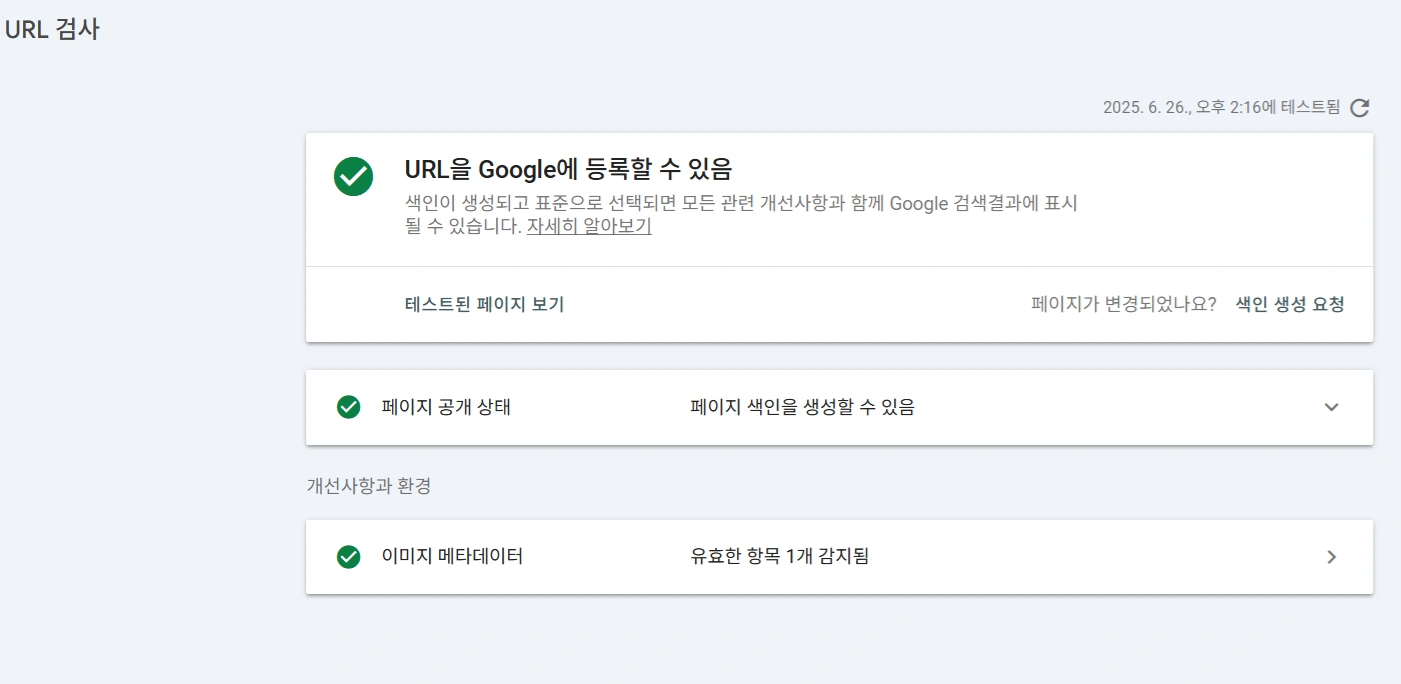

4. JavaScript Code for Dynamically Inserting Image Structured Data on Blog Platforms like Tistory
Creative image blogs must separate third-party images from their own creative images when applying meta tags. The code below is an example of using JavaScript to dynamically generate and insert JSON-LD metadata only for the creator's images wrapped with a specific class (div.my-license-img).
JavaScript Code Example (Including MutationObserver)
script
document.addEventListener('DOMContentLoaded', () = {
const buildImageMetadata = () = {
const images = [];
const seen = new Set();

// Collect only img tags within div.my-license-img (Filtering the creator's images)
document.querySelectorAll("div.my-license-img img").forEach(img = {
if (!seen.has(img.src)) {
seen.add(img.src);
images.push({
"@type": "ImageObject",
"contentUrl": img.src,
"url": img.src,
"caption": img.alt || "No alt text available",
"height": img.height.toString(),
"width": img.width.toString(),
"license": "https://everydayhub.tistory.com/", // Creator's license URL
"creator": {
"@type": "Person",
"name": "arhatnanda" // Creator's name
},
"copyrightNotice": "OPENIPC티스토리", // Creator's copyright notice
"acquireLicensePage": window.location.href, // Current post URL
"creditText": "OPENIPC티스토리" // Source attribution text
});
}
});

let script = document.getElementById("dynamicImageMetadata");
if (images.length) {
const jsonLd = {
"@context": "https://schema.org",
"@graph": images
};
if (!script) {
script = document.createElement("script");
script.id = "dynamicImageMetadata";
script.type = "application/ld+json";
document.head.appendChild(script);
}
script.textContent = JSON.stringify(jsonLd, null, 2);
} else {
script?.remove();
}
};

buildImageMetadata();

// Detect DOM changes and update metadata ( 대응 to image loading after Tistory placeholder conversion)
new MutationObserver(mutations = {
mutations.forEach(mut = {
mut.addedNodes.forEach(node = {
if (node.nodeType === 1) { // ELEMENT_NODE
if (node.tagName === "IMG" || node.querySelector("img")) {
buildImageMetadata();
}
}
});
});
}).observe(document.body, { childList: true, subtree: true });
});
/script
How to Apply Tistory Image Meta Tags
When inserting images, Tistory blogs use a special placeholder format. Since it is not a standard img tag, it must be wrapped with a div so that the JS can distinguish it.
- 1. Selectively Wrap Creator's Images: After inserting the image in Tistory, go to HTML editing and wrap the image code (placeholder format) with
div class="my-license-img".../div. - 2. JS Operating Principle: When the Tistory page loads, the placeholder is converted into an actual
imgtag. The JavaScript code above finds this converted image viadocument.querySelectorAll("div.my-license-img img")and generates the JSON-LD metadata. - 3. Utilizing MutationObserver: In environments like Tistory, where image loading is asynchronous or DOM changes are frequent,
MutationObserveris used to update the metadata whenever the page is fully loaded or a new image is added, preventing omissions.
5. Protect the Image Creator's Rights with Code
In order to protect the content of your uploaded creative images, ensure better visibility in search, and clarify the copyright of your work, structured data insertion is no longer optional but essential. Especially if you operate a design illustration photography blog, start adding legal and technical value to your content by inserting structured data and meta information today.
Frequently Asked Questions (FAQ) - Creative Image SEO and Copyright
Q1: Does image structured data affect text search SEO?
Yes, it does indirectly. By having structured data clearly explain the context and theme of the image (e.g., caption field) and increase the page's credibility (copyright, license information), search engines evaluate the overall quality of the page highly. Therefore, it can have an indirect positive effect on improving text search result rankings.
Q2: If I use both third-party free images and my creative images on one page, how should I apply structured data?
You must apply structured data only to your own creative images. Putting your creator or license information on third-party images constitutes misrepresenting copyright information, which can lead to Search Console warnings or more serious issues. The safe and correct way is to use a specific class, such as div.my-license-img in JavaScript, as in the example code above, to selectively generate meta tags only for your creative images.
Q3: Is it acceptable to set the license and acquireLicensePage fields to the current post's URL?
If the work is your own creation and you clearly explain the image usage terms (e.g., no commercial use) in that post, setting the current post's URL (window.location.href) is common and recommended. Google uses this link to guide users to check the image usage terms, which plays a decisive role in enhancing the image's source and copyright credibility.