Hide Empty Thumbnails and Expand Post Excerpt! JavaScript Script Optimization Guide for Automatic Blog Layout Cleanup
A guide on how to apply JavaScript code to automatically hide the empty thumbnail space of posts without an image on the blog's main/category page and expand the Excerpt area, resulting in a clean layout.
This automatic cleanup script enhances User Experience (UX) and contributes to page loading speed optimization, ultimately having a positive impact on Search Engine Optimization (SEO). Includes customized tips for Tistory blog operators.
In blog or website operation, images are one of the important factors that can positively affect Search Engine Optimization (SEO). In fact, posts that include appropriate images are more likely to stand out in search results and attract visitor attention. However, it is not mandatory to include an image in every post.
On the contrary, depending on the nature or topic of the content, images can sometimes have a negative impact, and unnecessary image insertion can slow down page loading speed, degrading User Experience (UX).
Especially on the main page or category lists, text-centric posts are frequently exposed without images, and in this case, if there is no image in the space structurally reserved for images (e.g., thumbnail area, figure tag, etc.), the empty space remains, leading to design breakage, page layout distortion, and a degraded user experience.
Therefore, blog operators can utilize methods such as adjusting the layout based on image presence and hiding blank thumbnails. In this article, we will explore a simple way to solve this issue.
How to Apply JS Code to Remove Empty Image Space and Improve Content Readability
This empty space issue can lead to a decrease in visitor page dwell time and a drop in site credibility, which can negatively affect Search Engine Optimization (SEO), so caution is needed.
Simple JavaScript Script to Hide Empty Space When No Image is Present
The JavaScript code below checks specific image container elements in the HTML (span.thum, figure.card-img-container, and all figure elements). If there is no image (img tag) within that area, the element is entirely hidden from the screen. This prevents the display of unnecessary empty space.
script
document.addEventListener('DOMContentLoaded', () = {
document.querySelectorAll('span.thum, figure.card-img-container, figure').forEach(el = {
const img = el.querySelector('img');
if (!img) {
el.style.display = 'none';
}
});
});
/script
Usage and Operating Principle
- Insert the above script on the blog's main page, category pages, or any page where image thumbnails are exposed. (It is generally recommended to insert it just before the
/bodytag in HTML editing.) - If the HTML structure uses
span.thum,figure.card-img-container, orfiguretags as image containers, this script automatically determines the presence of an image inside. - If no image is present, the corresponding container is hidden, the empty space disappears, and the layout is naturally tidied up.
Why is this script necessary? (UX, SEO Perspective)
- User Experience (UX) Improvement
If there is no image and only an empty box remains, visitors may find the page awkward and unprofessional. When the empty space disappears, the design completeness increases, and visitor satisfaction rises. - Page Loading Speed Optimization
If styles or elements remain in unnecessary empty spaces, the rendering burden may slightly increase. Removing them can indirectly contribute to speed improvement. - Search Engine Optimization (SEO) Effect
Search engines regard user experience as an important evaluation factor. A clean and meaningful content structure positively affects search rankings. Hiding the space when an image is absent helps improve content readability and structural understanding.
Additional Tip: Automating Blank Thumbnail Hiding and Excerpt Expansion for Tistory Blogs
When operating a Tistory blog, you often see posts with blank thumbnails (images) remaining as gray boxes on the main screen or category pages, like the example below.
In such cases, design completeness decreases, and the click-through inducement effect for users is reduced.
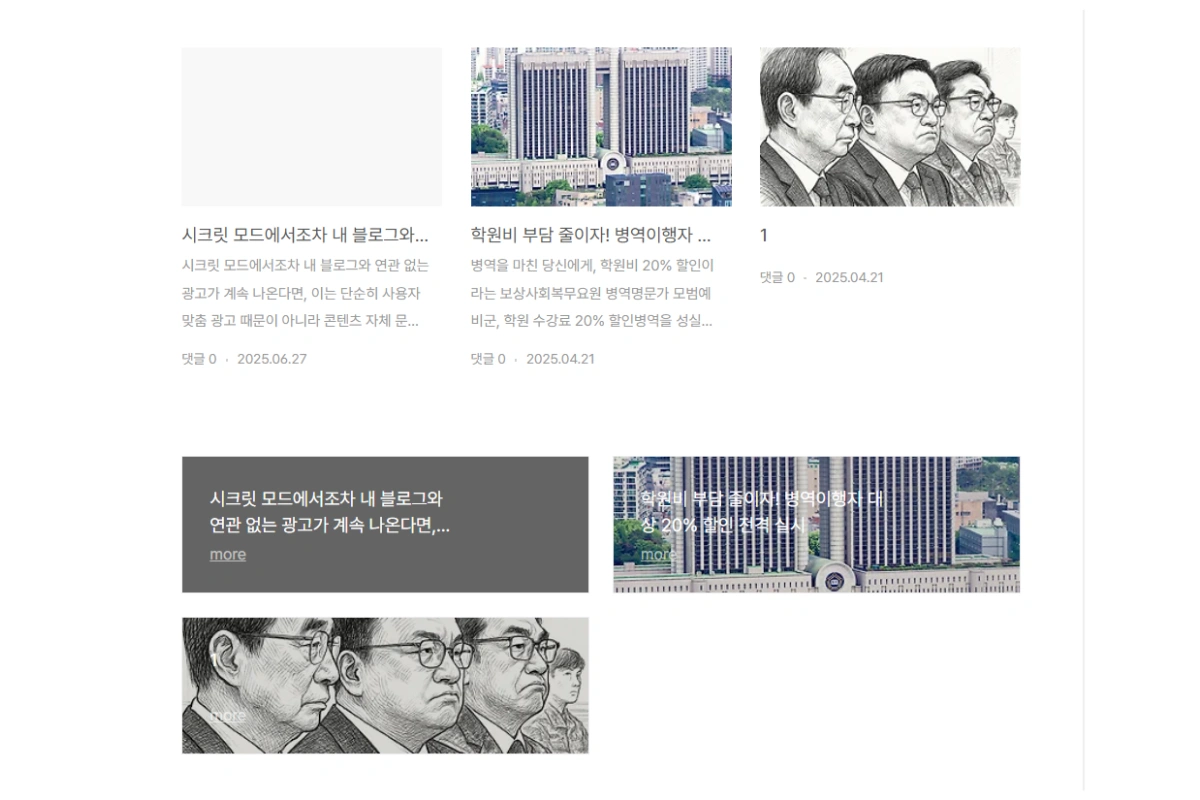
However, manually processing the thumbnail hiding for every post without an image is cumbersome.
For this, the method of automatically detecting items without images using JavaScript, hiding the thumbnail, and filling that space with the post excerpt is very effective.
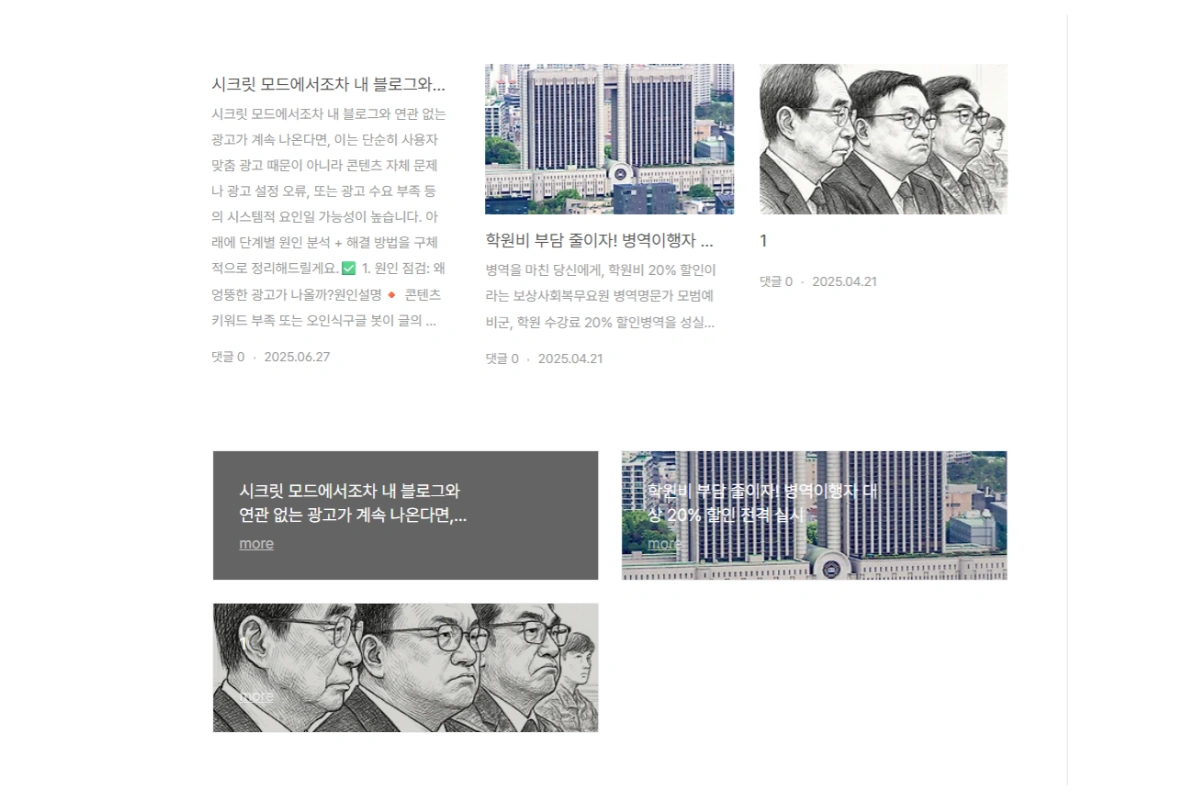
JavaScript Script with Added Excerpt Expansion Feature
Please insert the script below into your Tistory blog. This code dynamically cleans up the layout and expands the post excerpt by judging the presence of an image.
Insertion Location:
In the Tistory Admin Skin Editing HTML Editor, paste it right above the /body tag.
The code below is an example for Tistory Book Club. Please change the selectors (.thum, .post-item, etc.) according to your skin and modify the post height to match the image size.
script
document.addEventListener('DOMContentLoaded', () = {
const processElement = el = {
const thum = el.querySelector('.thum, span.thum');
const figure = el.querySelector('figure');
const hasImgInThum = thum?.querySelector('img');
const hasImgInFigure = figure?.querySelector('img');

const hasImage = hasImgInThum || hasImgInFigure;

if (!hasImage) {
if (thum) thum.style.display = 'none';
if (figure) figure.style.display = 'none';
el.classList.add('no-img');

const excerpt = el.querySelector('.excerpt');
if (excerpt) {
excerpt.style.webkitLineClamp = '9'; // Removes the line limit set by CSS to expand the excerpt
excerpt.style.maxHeight = 'none'; // Unlocks the maximum height limit
}
} else {
el.classList.remove('no-img');
}
};

document.querySelectorAll('.post-item, li').forEach(processElement);
});
/script- If the
.post-itemorliitem does not contain animgtag within the thumbnail element (span class="thum",div class="thum",figure, etc.), it is automatically hidden, performing the blank thumbnail hiding function. - If there is no image, the post excerpt is expanded by increasing the number of lines to fill the layout, thereby enhancing content readability.
- If an image is present, the existing design is maintained.
- Target Area: All areas of the blog layout that require automatic cleanup, such as the Tistory main screen, category lists, and related posts area.
Frequently Asked Questions (FAQ) - Blog Thumbnail and Layout Management
Q1: Do I absolutely need to include images in my blog posts? Does it negatively affect SEO?
Images can positively affect Search Engine Optimization (SEO), but they are not mandatory for every post. Conversely, depending on the content's nature, unnecessary image insertion can cause a decrease in page loading speed, degrading User Experience (UX), which can indirectly hurt SEO. For text-centric content, omitting images and cleaning up the layout might be more effective.
Q2: What is the fundamental problem caused by blank thumbnail space when there is no image, and why should it be fixed?
On the main page or category lists, the empty thumbnail space (e.g., a gray box) for posts without images remains, breaking the design and distorting the layout, which degrades user experience. This 'blank space problem' can cause visitors to distrust the site and lead to a drop in search rankings due to negative UX effects like decreased dwell time. Therefore, it should be fixed by automatically cleaning up the blog layout with a JavaScript script.
Q3: Is the script for hiding blank thumbnail space and expanding the post excerpt applicable to all blog platforms?
The script's core logic (determining image presence and then hiding/expanding the element) can be applied to any website. However, the selectors used within the code (.post-item, .thum, .excerpt, etc.) may vary depending on the blog skin (template) or platform (Tistory, WordPress, etc.) the user is using. Therefore, it is essential to modify the selectors to match your blog's HTML structure before using this script.