Excel Automation: Building a Flask-Based Web App for Invoice/Report Generation
Instantly convert Excel data into invoices and automated reports using a Flask-based Excel automation web app. Easily handle upload, editing, preview, and PDF output.
Introduction and Necessity of the Excel Automation Web App
In the digital workflow, Excel remains a core tool for data management. However, the process of converting this data into structured visual documents such as reports, invoices, and contracts is repetitive and time-consuming. Furthermore, manual copy-pasting increases the risk of errors. Automation is the necessary solution.
The code below provides a solution that addresses this tedious and inefficient gap. It is a lightweight enterprise automation method that leverages Python, utilizing the combination of Flask and Pandas. By simply uploading an Excel file, it enables the immediate generation, editing, and output (PDF) of standardized web-based documents.
In this article, we will explore the technical structure, implementation principles, and business value of this code.
Principles of Automated Excel Form Transformation
The core method for automatically generating Excel forms in this web application utilizes three main Python libraries.
1. Web Framework: Flask (Leveraging a Micro-Framework)
Unlike Django, Flask is a Micro Web Framework that provides only essential functionalities. The reasons for choosing Flask are:
- Lightweight and Speed: It is best suited for small, specific-purpose projects like an invoice generation app, running quickly without unnecessary feature overhead.
- Flexibility: Developers can freely integrate necessary libraries (Pandas, Openpyxl, etc.).
- Modularity: Core features like routing (`@app.route`), templating (`render_template`), and session management are clearly separated, making maintenance easy.
2. Data Processing Engine: Pandas (Excel Processing Method)
Pandas is the de facto standard library for data manipulation and analysis in Python.
- Power of DataFrame: It instantly converts Excel files into a 2D table structure called a DataFrame using `pd.read_excel(BytesIO(file_data))`. This makes accessing data rows and columns highly intuitive and efficient.
- Data Preprocessing: The code uses methods like `df.fillna('')`, `df.astype(str)`, and `df.dropna(how='all')` to handle Excel's missing values (NaN) and data type inconsistencies proactively, thereby preventing "Garbage In, Garbage Out" and ensuring the quality of the output document.
3. File I/O and Distribution: Openpyxl and PyInstaller
- openpyxl: This is the engine required by Pandas to read and write .xlsx format Excel files. As the code reads files in binary form, this dependency is essential.
- PyInstaller: A tool that bundles the entire app into a single executable file (.exe) so it can be run in environments without a Python installation. This provides ease of deployment and usage in enterprise environments.
Compilation Command
pyinstaller--onefile--nameInvoiceApp--add-data"templates;templates"--add-data"static;static"--collect-allopenpyxlapp.py
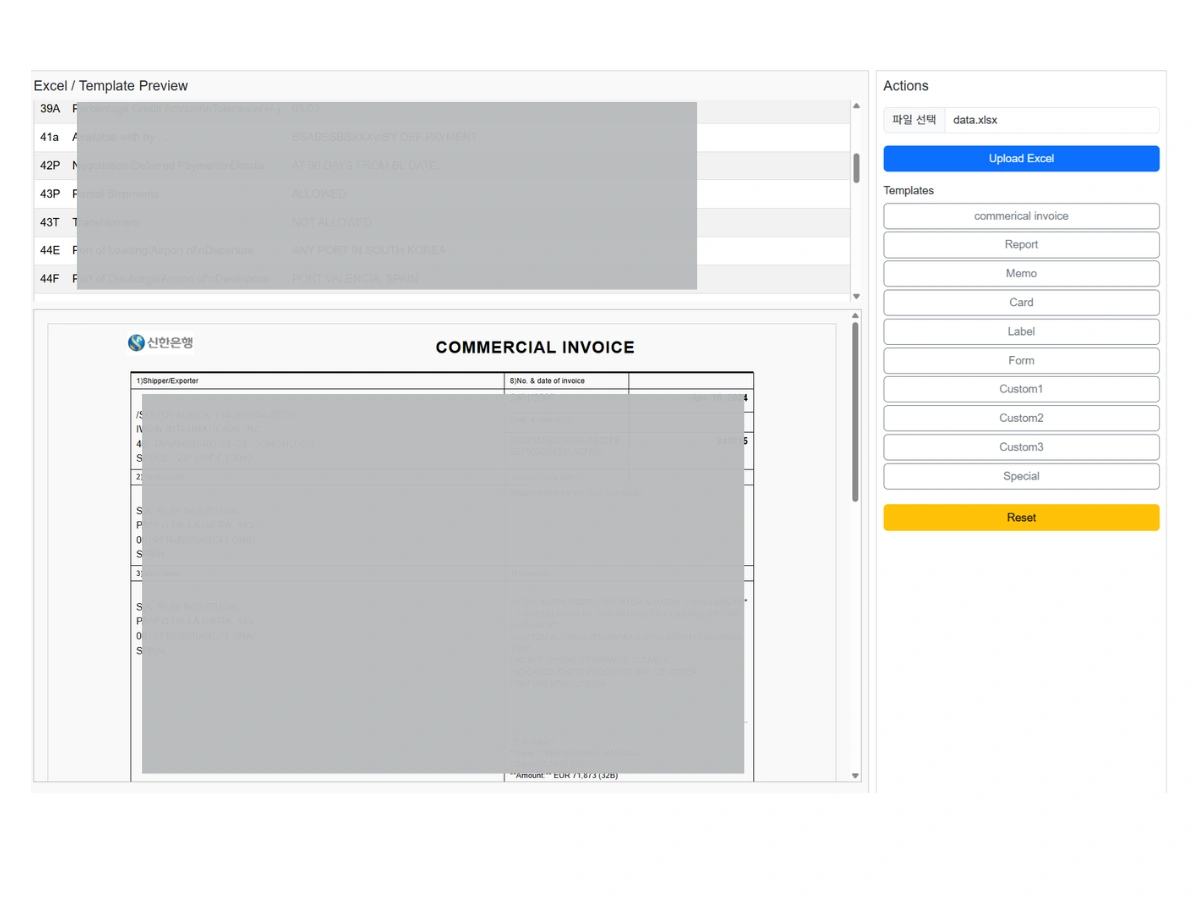
Logical Flow of Excel Data and Document Conversion Method
The code goes beyond "simply reading" Excel data; it utilizes it as dynamic variables to drive the template.
1. Data Extraction and Code Mapping
When an Excel file is uploaded, the server reads the file and performs the following logical inference:
| Excel Column (Estimated) | Purpose | Python Variable Storage Location |
| Column A (Index 0) | Code: Key values like INVOICE_NO, SELLER, TOTAL_AMT | Key of the `code_values` dictionary |
| Column B (Index 1) | Description: Supplementary explanation for the code | `code_values[code]['description']` |
| Column C (Index 2) | Value: Actual data to be inserted into the template | `code_values[code]['value']` |
- The code uses the XL_ prefix to flatten these Excel codes into template variables (`template_data['XL_' + code] = data.get('value')`). This approach allows values assigned to specific Excel cells to be accurately mapped to specific locations within the document.
Example:
Excel File Content
| 20 | Documentary Credit Number | 508434578 |
Form Template Application
h2 Invoice:{{XL_20}} /h2
Output
Invoice:508434578
2. Role of the Template Engine (Jinja2)
The call to `render_template(TEMPLATE_MAP[template_key], **get_template_data())` activates the Jinja2 template engine.
- Dynamic Content Insertion: Jinja2 finds placeholders in the form `{{ variable_name }}` within the HTML template file and replaces them with the actual data values provided by `get_template_data()`. For instance, `{{ XL_10 }}` is populated with the value from Excel's code 10 cell.
- Loop Processing (Item Lists): For numerous rows of Excel data (e.g., item lists), Jinja2's `{% for item in items %}` loop is used to automatically generate table rows from the DataFrame records. This allows the document to be perfectly structured regardless of the volume of data.
3. Total Amount Calculation and Formatting
The total amount is calculated inside the `get_template_data` function using `df['Amount'].astype(float).sum():,.2f} EUR`.
- Robust Formatting: It not only computes the sum but also uses `:,.2f` to display two decimal places, adds a comma thousand separator, and appends the currency symbol (EUR), creating a final output that meets business document standards.
Document Management and User Experience (UX) Optimization
This app includes features focused on how users manage and utilize documents in a real working environment, going beyond simple conversion.
1. Preview State Management (Session and History)
The code uses Session to persistently manage the user's state.
- `session['excel_file']`: Remembers the filename of the uploaded Excel data (saved to disk).
- `session['current_preview_file']`: Remembers the filename of the currently displayed preview HTML file.
- `session['preview_history']`: Stores the preview history when the user loads different templates or clicks previous/next buttons.
This history feature allows users to freely revert or advance through transitions between multiple templates.
2. Maintaining and Saving Edited Content (save_edited)
One of the most important UX features is the ContentEditable preview and the ability to maintain modified content.
- `contenteditable="true"`: Instead of loading HTML inside an iframe, the preview is wrapped in a Div tag with this attribute, allowing the user to modify the text directly in the browser.
- `session['edited_file']`: The HTML modified by the user when they click the 'Save' button is saved as a separate file on the disk. Subsequently, when the same template is reloaded, the code retrieves this edited file without re-rendering, thus maintaining the changes.
3. PDF Output Method
The `printPreview()` function has been modified to handle PDF saving, as per user requirements.
- Leveraging Browser Print API: The HTML template is loaded in a new window via `window.open()`, and `printWindow.print()` is called to open the browser's native print dialog.
- PDF Output: By selecting "Save as PDF" as the print destination, the user obtains a high-quality PDF document with applied CSS styles provided by the browser engine. This method is faster, more stable, and offers higher rendering accuracy than server-side PDF library conversion.
Business Value and Scalability
This straightforward approach goes beyond a simple technical project, offering tangible business efficiency to Small and Medium Enterprises (SMEs) and Freelancers.
1. Productivity and Cost Reduction
- Increased Throughput per Hour (TPO): Saves time previously spent on manually creating documents, allowing employees to focus on core tasks (analysis, sales, etc.).
- Template Reuse: Provides various template options (Standard, Report, Memo, etc.) to instantly convert the same Excel data into documents for multiple purposes.
2. Data Governance and Error Reduction
- Single Source of Data: Since all documents originate from a single Excel file, Data Consistency is maintained.
- Automatic Validation: Pandas automatically handles data format errors and performs accurate total sum calculations, reducing manual calculation and operational errors to 0%.
3. Scalability (Microservices Architecture)
The Flask app is easily scalable into a Microservices architecture.
- API Separation: The current `/upload` and `/load_template` routes can be separated into RESTful APIs for integration with other systems (e.g., CRM, ERP).
- Asynchronous Processing: For handling large Excel files, the upload function can be offloaded to an asynchronous task queue like Celery to improve user experience.
Program Usage
Project Directory Structureproject/
├──app.py
├──static/
│└──img/
│└──sin.jpg
└──templates/
└──invoice.html
Python File Index.html File
HTML Data Mapping Table
| Code | Variable | Description | Template Call |
|---|---|---|---|
| 40A | XL_40A | Form of Documentary Credit | {{ XL_40A }} |
| 20 | XL_20 | Documentary Credit Number | {{ XL_20 }} |
| 31C | XL_31C | Date of Issue | {{ XL_31C }} |
| 40E | XL_40E | Applicable Rules | {{ XL_40E }} |
| 31D | XL_31D | Date and Place of Expiry | {{ XL_31D }} |
| 50 | XL_50 | Applicant | {{ XL_50 }} |
| 59 | XL_59 | Beneficiary | {{ XL_59 }} |
| 32B | XL_32B | Currency, Amount | {{ XL_32B }} |
| 39A | XL_39A | Tolerance | {{ XL_39A }} |
| 41a | XL_41a | Available With | {{ XL_41a }} |
| 42P | XL_42P | Negotiation Details | {{ XL_42P }} |
| 43P | XL_43P | Partial Shipments | {{ XL_43P }} |
| 43T | XL_43T | Transhipment | {{ XL_43T }} |
| 44E | XL_44E | Port of Loading | {{ XL_44E }} |
| 44F | XL_44F | Port of Discharge | {{ XL_44F }} |
| 44C | XL_44C | Latest Shipment Date | {{ XL_44C }} |
| 45A | XL_45A | Goods Description | {{ XL_45A }} |
| 46A | XL_46A | Documents Required | {{ XL_46A }} |
| 47A | XL_47A | Additional Conditions | {{ XL_47A }} |
| 49G | XL_49G | Special Payment Conditions | {{ XL_49G }} |
| 71D | XL_71D | Charges | {{ XL_71D }} |
| 48 | XL_48 | Period for Presentation | {{ XL_48 }} |
| 49 | XL_49 | Confirmation Instructions | {{ XL_49 }} |
| 78 | XL_78 | Instructions to Bank | {{ XL_78 }} |
| 72Z | XL_72Z | Sender to Receiver Info | {{ XL_72Z }} |
Value of Python-Based Automation
The recent evolution of the Python ecosystem demonstrates its development beyond simple scripting into an independent software solution for real-world business problem-solving.
This Flask Invoice App combines the efficiency of Excel data processing, the accuracy of document generation, and the convenience of deployment to improve document workflows for businesses and individuals. Especially its capability for single-file distribution via PyInstaller increases accessibility for users lacking deep IT knowledge, promoting the democratization of automation technology.
Frequently Asked Questions (FAQ)
What libraries are used to implement the Excel automation web app?
The web app is implemented using Python-based libraries including Flask, Pandas, Openpyxl, and Jinja2. Flask serves as a lightweight micro-framework managing the web server and routing, Pandas efficiently reads and processes Excel data, Openpyxl supports Excel file I/O, and Jinja2 dynamically inserts data into HTML templates.
How does the conversion process from Excel data to a web document occur?
The uploaded Excel file is converted into a Pandas DataFrame, where columns and rows are mapped to Python variables. Codes, values, and descriptions are managed in a dictionary structure. The Jinja2 templating engine then inserts the actual data into the {{ variable }} positions within the HTML document. Repetitive lists are generated as table rows via a {% for %} loop, while total calculations and currency formatting are also automated.
How are user modifications and preview states managed?
The app uses Session to manage the uploaded Excel file, current preview file, and navigation history. With the contenteditable attribute, users can directly edit within the browser, and pressing 'Save' stores the modified HTML into a separate file so that changes persist during template reload.
How is PDF output implemented?
When the user initiates the browsers 'Print' function, the HTML template is loaded in a new window and printWindow.print() is executed to invoke the native print dialog. Choosing Save as PDF produces a high-quality PDF with CSS applied;faster and more stable than server-side PDF generation.
What are the business advantages of this automation app?
SMEs and freelancers can significantly reduce document creation time while maintaining data consistency and accuracy. Templates can be reused, reducing errors and saving cost and labor. The Flask-based microservice architecture also supports scalability and integration with other systems.
https://everydayhub.tistory.com/1150
https://everydayhub.tistory.com/1154