Blog Table of Contents: Good for User Accessibility, but Safe for SEO? (CLS Risk Management)
The blog Table of Contents (ToC) enhances user accessibility but carries the risk of CLS (Cumulative Layout Shift) issues and Google's potential automated link spam penalty when generated dynamically. This article analyzes the SEO problems of automatic ToCs and presents a strategy and code for implementing a sidebar popup ToC that satisfies both SEO optimization and Core Web Vitals metrics.
One of the many tools to enhance blog content quality and accessibility is the 'Table of Contents' (ToC). Especially for long and structured articles, the ToC greatly helps readers quickly grasp the content and navigate to desired sections, allowing for logical content management. However, as automatically generated ToC features become widely used, cases of unintentionally causing problems from an SEO perspective have also arisen, particularly concerning Keyword distribution.
The Double-Edged Sword of the ToC Feature: SEO Optimization and CLS Risk Management
In this article, we will examine in detail the advantages of an automatic ToC, the potential SEO issues it may cause, and their solutions. A strategy for safely and efficiently using the ToC feature is crucial in the era of Core Web Vitals.
Advantages of the ToC Feature: Improved User Accessibility and Navigability
Including a ToC in a blog article offers the following benefits. These are factors that contribute directly to the User Experience (UX):
- The article structure can be grasped at a glance: Even with long articles, key content can be quickly checked and navigated.
- Enhanced Navigability: Users can easily find the information they want, helping to lower the bounce rate, especially for specific search queries (Long-tail Keyword).
- Improved Accessibility: It acts as a visual navigation aid and has a positive effect on web accessibility.
- Increased Scannability: Readers can quickly scan the article and move to the necessary information.
For these reasons, many bloggers place the ToC at the top of the article, which is a very common strategy.
In-Depth Analysis of the Limitations and SEO Issues of Automatic ToCs
The problem lies in the automatically generated ToC feature. A ToC manually created by the operator is evaluated as a positive signal to search engines, clearly revealing the internal link structure. However, automatically generated ToCs are often dynamically created via JavaScript after browser rendering, which can lead to CLS (Cumulative Layout Shift) issues that compromise the visual stability of the content, impacting Keyword performance.
Furthermore, since late 2023, Google has shown a tendency to judge automatically generated links or ToCs as spam elements, strengthening related algorithms. Because of this, I personally experienced discontinuing the automatic ToC feature for a while.
1. CLS Issue (Cumulative Layout Shift) and Core Web Vitals
Automatically generated ToCs are often inserted late via JavaScript after the content has been fully rendered. This can cause the CLS (Cumulative Layout Shift) phenomenon , where the page layout suddenly shifts or shakes. This is one of the Core Web Vitals, which degrades user experience and can negatively affect Google's page experience assessment, potentially leading to a drop in SEO ranking.
2. Google's Increased Spam Handling Issue and Automatic Link Recognition
In December 2024, Google strengthened its evaluation criteria for automated internal link structures through a core algorithm update. Key points include:
- Strengthening the criteria for classifying automated link generation patterns with low content quality as spam.
- Increased possibility of penalty if perceived as an intentional attempt to manipulate search ranking, rather than internal link optimization, affecting the effectiveness of Related Keyword linking.
In short, if an automated ToC repeatedly lists links in the same format and only includes titles without explanation, the likelihood of Google search engines perceiving it as a mechanically generated collection of spam links has increased.
3. Increase in Unnecessary Content and Decline in Content Accessibility
While the ToC is a useful tool for information retrieval, if it is unconditionally placed at the top of the article, it can actually obstruct access to the main content. Especially if the automatically generated ToC is long and excessively detailed, users may require more scrolling and time to reach the core content, potentially leading to increased bounce rates or user inconvenience. This lowers the user satisfaction index, a critical factor in SEO.
Should We Abandon the ToC? (Balancing SEO and UX Strategy)
It is clear that the ToC is a beneficial tool for users. However, if both SEO and User Experience (UX) are considered, the following strategic utilization is necessary. The key is to show the ToC only when needed and to avoid affecting the layout.
Alternative 1: Implementing a Sidebar Popup ToC (CLS Prevention Strategy)
Give the user a choice and minimize CLS issues!
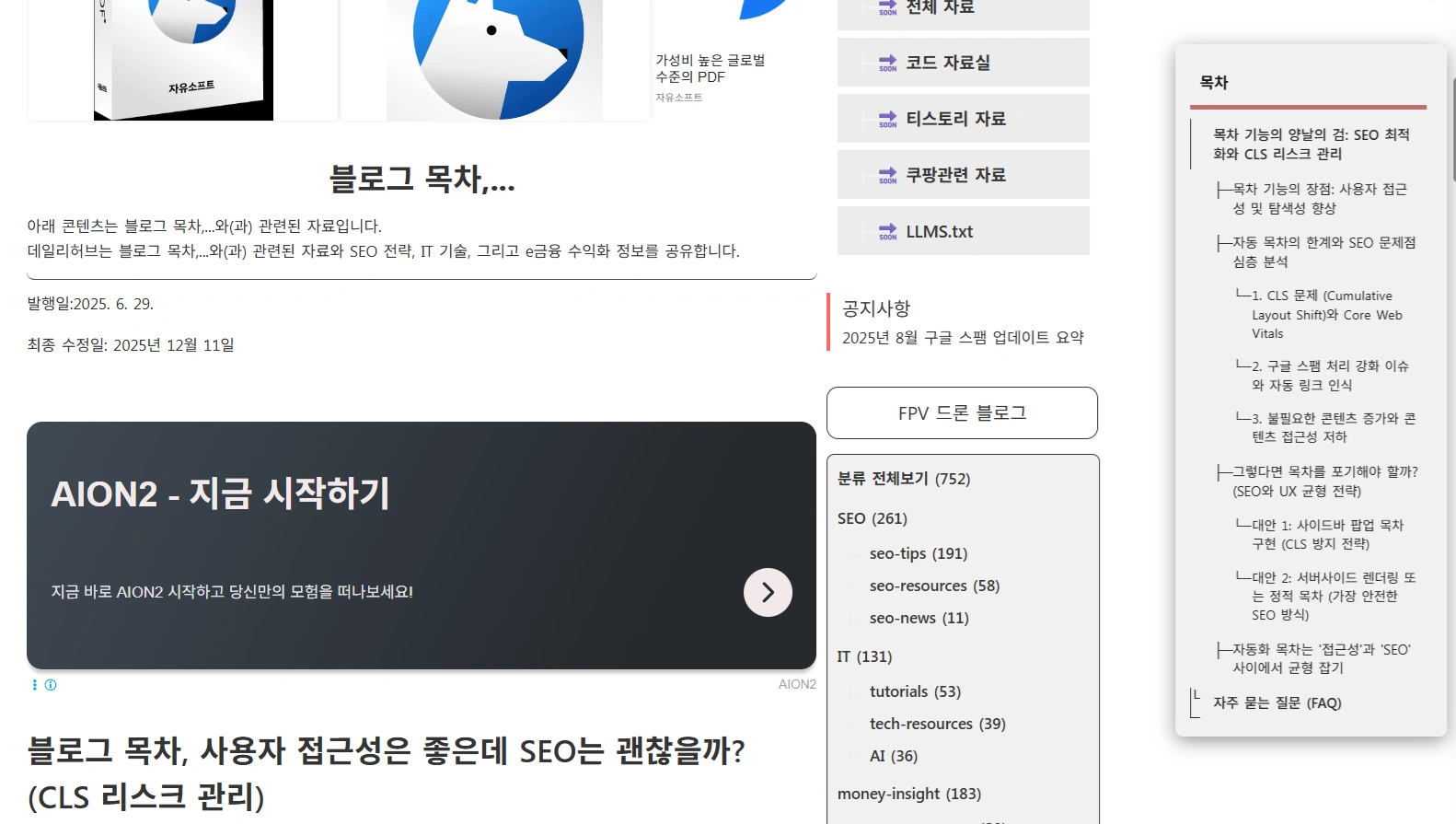
Switching to a sidebar popup ToC UI instead of a fixed form at the top of the content is a practical way to reduce CLS issues and concerns about SEO penalties. This approach considers both UX and SEO by structuring the ToC to be shown only when the user clicks or when the screen is sufficiently wide, rather than fixing it at the top of the article, which causes CLS (Cumulative Layout Shift).
- CLS issues are prevented and content flow is not disrupted by processing the ToC to be displayed only when the popup button is clicked after content loading is complete.
- The risk of being perceived as a spam link is reduced by processing the ToC to control Google's crawler access using a combination of
div style="display:none",aria-hidden="true", or the robots noindex property to prevent crawling of the automatic internal links, which often link based on the primary Keyword. - In desktop environments, convenience can be maintained by fixed exposure on the sidebar.
HTML Structure Example (ToC Toggle Button and Popup Area)
!-- ToC Toggle Button --
div id="toc-toggle"Table of Contents/div

!-- ToC Area (Initially hidden) --
div id="toc-popup"
div id="toc"
ul/ul
/div
/div
JavaScript Code Insertion (Recommended immediately above the /body tag)
script
document.addEventListener("DOMContentLoaded", () = {
const tocList = document.querySelector("#toc ul");
const popup = document.getElementById("toc-popup");
const toggle = document.getElementById("toc-toggle");
const headings = document.querySelectorAll(".tt_article_useless_p_margin.contents_style h2, .tt_article_useless_p_margin.contents_style h3, .tt_article_useless_p_margin.contents_style h4");

if (!headings.length || !popup || !toggle) {
if(popup) popup.remove();
if(toggle) toggle.remove();
return;
}

headings.forEach((heading, i) = {
if (!heading.id) heading.id = "heading-" + i;
const li = document.createElement("li");
if (heading.tagName === "H2") li.classList.add("h2-item");
else if (heading.tagName === "H3") li.classList.add("h3-item");
else if (heading.tagName === "H4") li.classList.add("h4-item");
const a = document.createElement("a");
a.href = "#" + heading.id;
a.textContent = heading.textContent;
li.appendChild(a);
tocList.appendChild(li);
});

let userToggled = false;

function updateDisplay() {
// Automatically display ToC in desktop environments 1500px and wider (maintain popup form)
if (!userToggled) {
popup.style.display = window.innerWidth = 1500 ? "block" : "none";
}
}

updateDisplay();

toggle.addEventListener("click", () = {
popup.style.display = popup.style.display === "block" ? "none" : "block";
userToggled = true;
});

window.addEventListener("resize", updateDisplay);
});
/script
This ToC is initially hidden and configured to display automatically only on desktop screens. For mobile users or smaller screens, it only appears when the user presses the button, and CSS or HTML attributes are used in combination to control Google crawler access.
Alternative 2: Server-Side Rendering or Static ToC (The Safest SEO Method)
Instead of dynamically inserting the ToC with JavaScript, including the ToC directly within the HTML document from the start is the most SEO-friendly approach. This is called a Static ToC or Server-Side Rendered ToC Insertion . If possible, inserting the ToC directly into the HTML is preferable over JavaScript rendering. This offers the following advantages:
- The ToC already exists in the DOM when the page loads, so there is absolutely no risk of CLS.
- Google recognizes the ToC links as part of the content, which actually helps internal link optimization and can improve PageRank flow for target Keywords.
The disadvantage is that it is difficult to automate as it requires manual management. This may be challenging on platforms with limited HTML structure editing, like Tistory blogs, but this method is strongly recommended for WordPress or self-hosted blogs.
Automated ToC: Balancing 'Accessibility' and 'SEO'
The automated ToC is clearly a good tool for enhancing usability. However, indiscriminate application can harm SEO performance and lead to penalties from Google's algorithm. To maintain the ToC feature while keeping it SEO-friendly, the following points must be adhered to:
- The ToC should be processed to be included in the DOM during initial loading, if possible, to avoid CLS.
- ToCs automatically generated by JavaScript should be treated as a sidebar popup or an initially non-exposed area to prevent pushing down the main content.
- Internal ToC links must be structured based on Related Keyword concepts relevant to the content and managed carefully to avoid being perceived as spam by Google.
Frequently Asked Questions (FAQ)
What is the surest way to completely eliminate the risk of an automatically generated ToC being treated as spam by Google?
The most certain method is to switch to a static approach where the ToC is written directly into the HTML. If you stick with a dynamic ToC, it should be treated as a popup (Hidden) form, and the div containing the ToC should be given the robots noindex attribute, or the script should be managed in a way that intentionally does not allow the ToC links to be exposed in Google search results (Jump To Links).
Can I specify an initial height for the ToC area to solve the CLS issue?
Yes, that is correct. If you pre-specify the minimum height (min-height) of that area using CSS before the ToC loads, you can minimize the layout shifting (CLS) that occurs when the ToC is dynamically inserted. This is known as a layout shift prevention technique.
Does Google recognize links that move to a specific section of the article using the ToC?
Yes. Google recognizes fragment links (#) using the id attribute assigned to h2 and h3 tags and can display links (Jump To Links) in search results that move directly to specific sections. This is a good signal that enhances user experience, but care must be taken that the ToC links are not perceived as spam, especially for Long-tail Keyword sections.