When AdSense Ads Don't Show? Ad Non-Display Causes, Countermeasures, and Revenue Strategies
We analyze the fundamental causes of AdSense ad non-display (blank spaces), and summarize specific SEO and technical countermeasures—including the Triple Alternative Ad Strategy and Google's AI-based Unfilled Space Optimization System—to prevent revenue loss and increase the Fill Rate.
If you run a blog, you have probably experienced this situation at least once: The ad should be displayed, but nothing appears, or there is only a blank space. This ad non-display, or 'Unfilled Slot,' is more than just a visual problem; it can lead to Blog Revenue Loss, cause CLS (Cumulative Layout Shift) issues among the Core Web Vitals, and result in poor accessibility of content design.
To address this problem, we have introduced several counter-measures over time.
The first suggested methods included securing ad space, solving margin issues, and various other methods, such as addressing cache problems. One of these was a method using images to secure ad space, and a more advanced version was the Triple Ad Exposure Structure. This structure operates as follows:
- 1st Attempt (High Revenue): Attempt to display AdSense ads normally.
- 2nd Alternative (Medium Revenue): If AdSense fails to display, substitute with an alternative platform ad like Adfit or Tenping.
- 3rd Supplement (Low Revenue/UX): If even Adfit fails to display, cover the blank space with an internal recommended content banner, affiliate image, or self-promotion banner to prevent CLS and UX issues.
This approach can be effective in reducing ad revenue loss and providing users with a stable screen where the content is not broken. Furthermore, to optimize ad exposure, including AdSense, we have explored various display methods such as top fixed ads, category automated ads, side ads, and comment area expansion. However, we acknowledge that some of these methods may be deemed violations of Tistory's operating policy and may result in penalties.
Google's Official Countermeasure: AI-Based Contextual Recommendation System and Monetization
Recently, it has become clear that Google officially recognizes this Ad Non-Display Issue as well. As of July 2025, Google is experimenting with new ways to more efficiently utilize unfilled in-page ad spaces in the AdSense ad system, which it plans to fully implement soon. This is a groundbreaking change that creates revenue opportunities even when ad bidding fails.
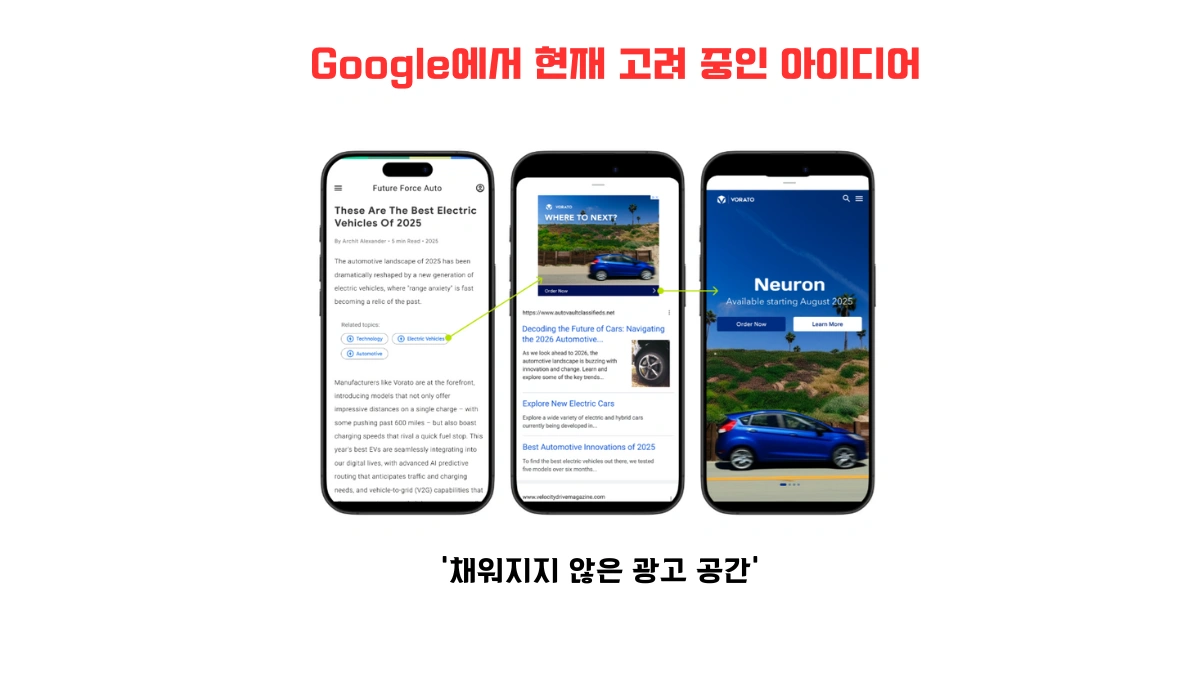
Previously, when an ad failed to display, the space remained empty. Now, Google intends to transition to a new model where it inserts AI-based, contextually relevant recommended content into that space to encourage user clicks, followed by displaying an ad after the click. This is a long-tail revenue model that secures potential revenue while maintaining user experience (UX).
This article will focus on the following content:
- The fundamental cause of ad non-display: Technical issues vs. RTB bidding failure
- Existing multi-alternative ad counter-strategy for monetizing blank space
- Detailed analysis of Google's upcoming contextual recommendation-based ad transition method
- Content design strategy to increase AdSense Fill Rate
Key Features and Expected Effects
The Google system for optimizing unfilled ad space, which is being introduced in phases starting July 2025, is Google's official countermeasure to reduce revenue loss due to RTB bidding failure.
- Contextual Recommended Content Provision
Instead of an ad, highly relevant internal content (recommended articles) or product/service recommendation content based on the page's topic is automatically displayed. (Example: Recommending 'Traveler's Insurance Information' in an article on 'Recommended Travel Destinations') - Ad exposure converts to an interactive panel format upon recommendation click (Users are shown the ad after showing interest, which is likely to increase Click-Through Rate (CTR))
- The 'Fill empty in-page ad units' setting in Google AdSense is automatically activated.
- Secures user dwell time and induces potential revenue conversion even when ad bidding fails.
Setting Changes and Disabling Method
- Log in to your AdSense account
- Go to [Brand safety] [Content] [Blocking controls]
- Click on the [Ad serving] menu
- It is possible to disable Fill empty in-page ad units within the 'Display ads' section (if necessary)
This feature is enabled by default, and blog operators only need to choose whether to disable it. Utilizing this feature can solve the ad non-display blank space issue without a separate alternative script.
Fundamental Analysis of Ad Non-Display Causes and Technical Countermeasures
AdSense uses a Real-Time Bidding (RTB) system to analyze a visitor's interests and page content, and then matches the most suitable ad to that space. A spot where an ad fails to display in this system becomes a non-revenue generating space, or an Unfilled Ad Space on the site. The causes of non-display are broadly divided into two categories: 'Internal structure problems' and 'External bidding failure.'
1. Internal Code or Structural Issues (Ad Slot is missing)
This is a technical non-display caused by an operator's blog platform structure or ad code configuration error. These factors prevent the ad system from recognizing the slot or interfere with loading.
- Duplicate ad slots or script overlap: Multiple ad codes are inserted in the same ad location, causing conflicts.
- Failure to secure ad space (CSS Issue): CSS settings such as `display:none`, `visibility:hidden`, or `overflow:hidden` on the ad box interfere with ad loading and prevent the ad `iframe` from being generated (Ad Loading Block).
- Ad restrictions or insertion failure due to low-quality content (duplicate articles, automatically generated content, Google policy violation content, etc.)
- Missing ad iframe: AdSense needs to generate an `iframe` tag, but due to a code error, the generation itself does not occura critical structural issue. Failure to load the `pubads_impl_*.js` file also falls into this category.
In this case, the ad system cannot recognize the slot and therefore cannot place an ad. Errors must be checked in the Developer Tools (Console).
Solution Direction:
- Verify that the ad code is correctly inserted and remove duplicates
- Check with Developer Tools (Elements) to see if the `iframe` is generated normally
- Review whether the layout is suitable for ad exposure, and pre-specify the minimum height (min-height) of the ad area to prevent CLS
2. Ad Non-Bidding Due to External Factors (RTB Bidding Failure)
If the ad code is correctly inserted but the ad space is still empty, it is mostly due to advertiser bidding failure or external environmental causes, which directly relates to the Fill Rate. That is, the technical conditions for displaying the ad were met, but it was not awarded in the competition.
Main Causes of Ad Non-Display Based on External Factors
- Absence of Advertiser Bids (No Bid): The advertiser did not bid on the corresponding keyword, visitor information, location conditions, etc. (Most common cause)
- Low Cost-Per-Click (CPC) or insufficient profitability: Ad price is low or the expected CTR is low, so AdSense chooses not to display it.
- Ad filter or content restriction: Ads are blocked due to sensitive or restricted content (e.g., adult, illegal content).
- AdBlock usage: Ad loading itself is blocked by the visitor's browser environment (Requires a counter-script)
- Lack of user targeting: The visitor does not match the target desired by the advertiser, so ad bidding does not occur.
| Classification | Main Cause | Technical/Operational Countermeasure |
|---|---|---|
| Code/Structural Issue | iframe not generated, ad area hidden by CSS, duplicate code | Review HTML structure and CSS, set `min-height`, apply Ad Code Asynchronous Loading (Async Loading) |
| External Bidding Failure | No advertisers, low price, content restriction, AdBlock | Create high-price content based on keyword research, apply Multi-Alternative Ad System, utilize AdBlock detection script |
How to Utilize Blank Ad Space?
Converting 'Non-Revenue Space' into Revenue Space with Alternative Ads/Content
A blank space resulting from the failure of an AdSense ad to load should not be left empty. JavaScript should be used to detect the loading status of the AdSense slot and, upon failure, automatically insert a prepared alternative content (Adfit, internal links, affiliate banners) to protect both profitability and UX simultaneously. (Triple Alternative System)
SEO Strategy and High-Revenue Content Optimization Tips to Counter Ad Non-Display
The following SEO and content optimization strategies are designed to prepare for non-display situations and, ultimately, maximize revenue by increasing the Fill Rate and CPC. This is a core strategy to be classified as High-Quality Inventory, which advertisers prefer, thus gaining an advantage in the bidding competition.
- High-Price Keyword Analysis and Content Design: (e.g., Financial Product Reviews, In-Depth IT Technology Analysis, High-Value Real Estate/Insurance) Use keyword research tools to discover long-tail keywords with low competition and high cost-per-click and design content around those topics. (Strengthening the Long-Tail Revenue Model)
- Enhance Semantic Markup and Structure Optimization: Increase the content quality score by utilizing h1~h3, p, alt, and schema.org structure so that Google crawlers can analyze it accurately. This helps classify the content as High-Quality Inventory favored by advertisers.
- Clearly Section Off Ad Areas and Prevent CLS: Clearly designate the ad space using CSS or `div class="ad-area"` and set `min-height` to prevent CLS errors. A stable page gains an advantage in ad bidding competition.
- Mobile Speed Optimization: Apply asynchronous (Async) processing to ad loading and image Lazy Loading to improve LCP (Largest Contentful Paint). Fast page loading reduces user abandonment and increases bidding opportunities. (Core Web Vitals Compliance)
- Utilize Ad Loading Failure Detection Script: Build an Automatic Alternative System that uses `MutationObserver` to monitor whether the `iframe` of the ad slot is generated, and immediately insert an internal content recommendation widget upon failure.
Google AdSense ads are not always displayed. Due to various factors such as ad bidding failure, content incompatibility, or user environment, unfilled ad slots result in direct revenue loss.
However, we can sufficiently monetize that space or convert it into an element that improves visitor experience using Adfit, affiliate images, or internal content recommendations. Furthermore, by utilizing the AI-based contextual recommendation insertion technology that Google is planning to provide, there will be more opportunities to capture user interest and convert it into revenue, even when ads do not appear.
Summary:
Ad non-display is an unavoidable variable, but it can be overcome through a high-price content strategy and a Triple Alternative technical response.
A blank space is not a 'lost revenue spot' but a long-tail opportunity to create new revenue and creative space.
Frequently Asked Questions (FAQ)
What is the most common cause of AdSense ad non-display?
The most common cause is RTB (Real-Time Bidding) failure due to external factors. This means the advertiser either did not bid on the visitor or keyword for that page, or the CPC was low, leading the AdSense system to decide not to display an ad. Unless it is a technical issue (code error, CSS hiding), bidding failure is the main culprit.
Why does ad non-display lower a blog's CLS (Cumulative Layout Shift) score?
CLS is a Core Web Vitals metric that measures visual stability. When the area where the ad should load is not reserved in advance, the ad suddenly loads later, causing surrounding content to shift or move (layout shift). To solve this problem, you must use the CSS `min-height` property to pre-specify the minimum height of the ad area.
How does Google's newly introduced 'Unfilled Space Optimization System' generate revenue?
Google's new system is that when ad bidding fails, it automatically displays internal recommended content related to the page content instead of an ad slot. When a user clicks this recommended content, it transitions to an interactive panel that exposes the ad. This is a strategy to secure potential click opportunities and convert them into revenue in a long-tail manner, without harming the user experience.