Is the Editor Width Narrow and Does the Post Disappear? A Way to Solve Both Problems at Once
We introduce an auto-save and screen width adjustment tool that simultaneously resolves the loss issue of posts disappearing while writing blog content and layout errors caused by a narrow editor width. Use this tool on various platforms like Tistory and WordPress to maximize safety and editing efficiency, establishing an SEO-optimized writing environment.
Have you ever had your browser suddenly shut down while writing a blog post?
The experience of your work-in-progress suddenly vanishing due to a loss of internet connection or accidentally hitting the back button is something almost everyone has experienced. The feeling of disappointment when a carefully written post disappears before it can be saved is indescribable. There is another hidden inconvenience many bloggers face.
It is the editor width limitation issue. Most platforms like Tistory, WordPress, and Naver Blog have a fixed editor width, meaning you write the post in a state completely different from the actual display screen. As a result, layout errors are prone to occur, such as images or tables breaking, or line breaks appearing awkward. This difference is especially pronounced when writing responsive content.
The Best Blog Writing Environment Achieved Through Auto-Save and Screen Width Adjustment
This article introduces a tool that can solve the problems mentioned above simultaneously. It is an editor tool that combines the auto-save function and the editor width adjustment function.
- Auto-save function to prevent posts from being lost
- Screen width adjustment function that can be tailored to the actual content exposure environment
These two functions are not just for convenience; they are key elements that can enhance the completeness, safety, and editing efficiency of blog content. Now, write freely without worrying about content loss, in an accurately adjusted screen width! This ultimately leads to the improvement of user experience (UX), which is fundamental to search engine optimization (SEO).
1. Problem Analysis Summary and Factors Hindering Blog Productivity
We analyze in detail the two major problems frequently encountered during the process of creating blog content.
- Post loss due to insufficient auto-save
Most blog editors provide weak or only manual saving at regular intervals. The potential for complete content loss due to browser crashes, accidental back buttons, or tab closure exists, meaning the results of long work can vanish in an instant. - Editing inconvenience and layout errors due to editor width limitation
Editors for Tistory/WordPress, etc., have a fixed width (e.g., less than 800px), so the author works in a narrow width even though the actual mobile/PC screen is responsive. This makes layout errors, such as broken image placement or awkward content alignment, likely to occur, making it vulnerable to responsive web design.
2. Solution: Core Principle of the Integrated Auto-Save + Width Adjustment Tool
The executable file introduced here integrates an automatic backup and real-time editing environment optimization function to resolve the major inconveniences that occur when writing blog content.
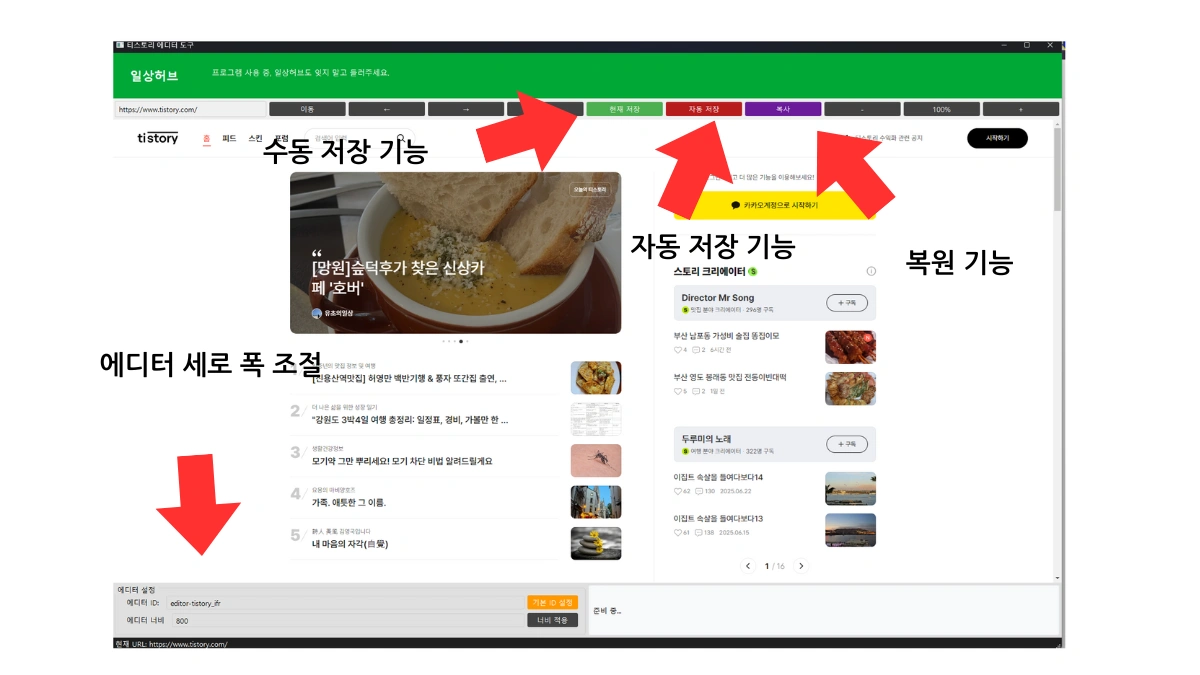
Auto-Save Function Details
- Content entered is backed up every set interval (10 seconds) to local storage (localStorage) and a separate text file, ensuring content safety.
- Saved posts can be easily restored even after an unexpected termination, allowing the user to focus solely on writing without worrying about losing content accidentally.
Editor Width Adjustment Function Details
- Users can directly set the editor width, with adjustments possible from 10px to unlimited width.
- Editing in a width similar to the actual screen minimizes layout errors, and provides an environment where the alignment of responsive content can be checked in real-time according to the size of the accessing device during writing.
3. Blog Editor Executable File Features and Backup Management
The executable file provided is designed to simultaneously solve the problems of post loss and editor editing inconvenience that may occur when writing blog content. It includes various functions such as auto-save, manual save, restore, and width adjustment, and all backup files are stored in the same folder as the executable file for easy management.
- Auto-save file: `auto_saved_tistory_editor_content.txt`
- Manual save file: `tistory_content.txt`
The table below describes each function. Caution: Turn off the auto-save function when leaving your desk!
| Function | Description |
| Auto Save | Automatically saves the content being written to local storage every 10 seconds. Since auto-save proceeds when closing or navigating away from the window during work, it needs to be stopped before exiting. |
| Manual Save | Allows direct saving when taking a break or at an important point, and is safely stored in a separate file (tistory_content.txt). |
| Restore Function | Removes unnecessary code (e.g., data- attributes) from the saved backup, and automatically copies the restored content to the clipboard for easy reuse in the blog editor. |
| Width Adjustment Function | Allows the user to set the editor width directly using CSS and JavaScript, enabling free adjustment between 10px and unlimited width to preview the exact layout. |
| Executable File Format | Can be used immediately by running the EXE file without a separate installation process. All components are consolidated into a single file, so load time may be incurred. |
| Execution Convenience | Operates in the basic environment of the Windows operating system without external libraries, and is easy for beginners to use, lowering the barrier to entry for blog content creation. |
Backup File Location Summary
- All saved files created after running the program are stored together in the folder where the executable file (.exe) is located.
- Recovery is quick by opening the file during restoration, copying the contents directly, and reusing them.
![압축 해제 후 exe 실행 보안 경고 시 [추가 정보] [실행].](https://blog.kakaocdn.net/dna/bcCx4d/btsO3xIuuJT/AAAAAAAAAAAAAAAAAAAAAGT1iK-nmBhQvL-2rALsWNE7RJfSBgXNXwpqJp9-F8UB/img.webp?credential=yqXZFxpELC7KVnFOS48ylbz2pIh7yKj8&expires=1767193199&allow_ip=&allow_referer=&signature=xNRQb2XJb9NUWe1PwkWdABXJB0U%3D)
![압축을 풀고 exe 파일을 실행하세요. 보안 경고창이 뜨면 [추가 정보] [실행]을 누르면 됩니다. 이후엔 바로 실행됩니다.](https://blog.kakaocdn.net/dna/cPVKlw/btsO3Re5fUU/AAAAAAAAAAAAAAAAAAAAAMcArzFGaqirpe33aLb_7GEcswhuDiPU1Q9anujwXcC_/img.gif?credential=yqXZFxpELC7KVnFOS48ylbz2pIh7yKj8&expires=1767193199&allow_ip=&allow_referer=&signature=yUFZ3DtQv6AhHmefkbMKhJDLWfE%3D)
4. Editor Usage Method and Key Feature Demonstration
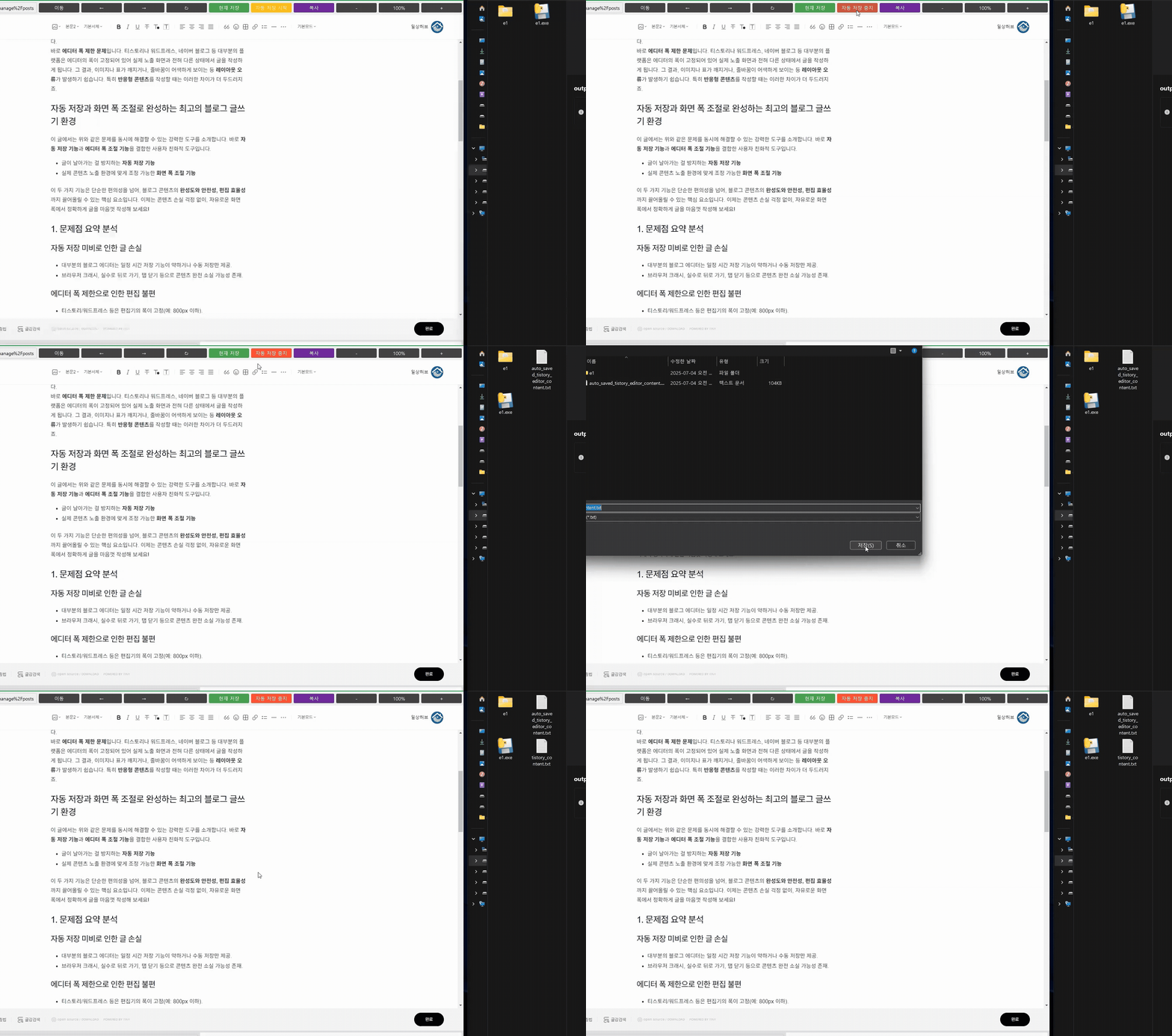
1. Current Save (Manual Backup)
Easily save the current content to a file. This enhances safety by manually backing up the entire content of the post at important turning points.
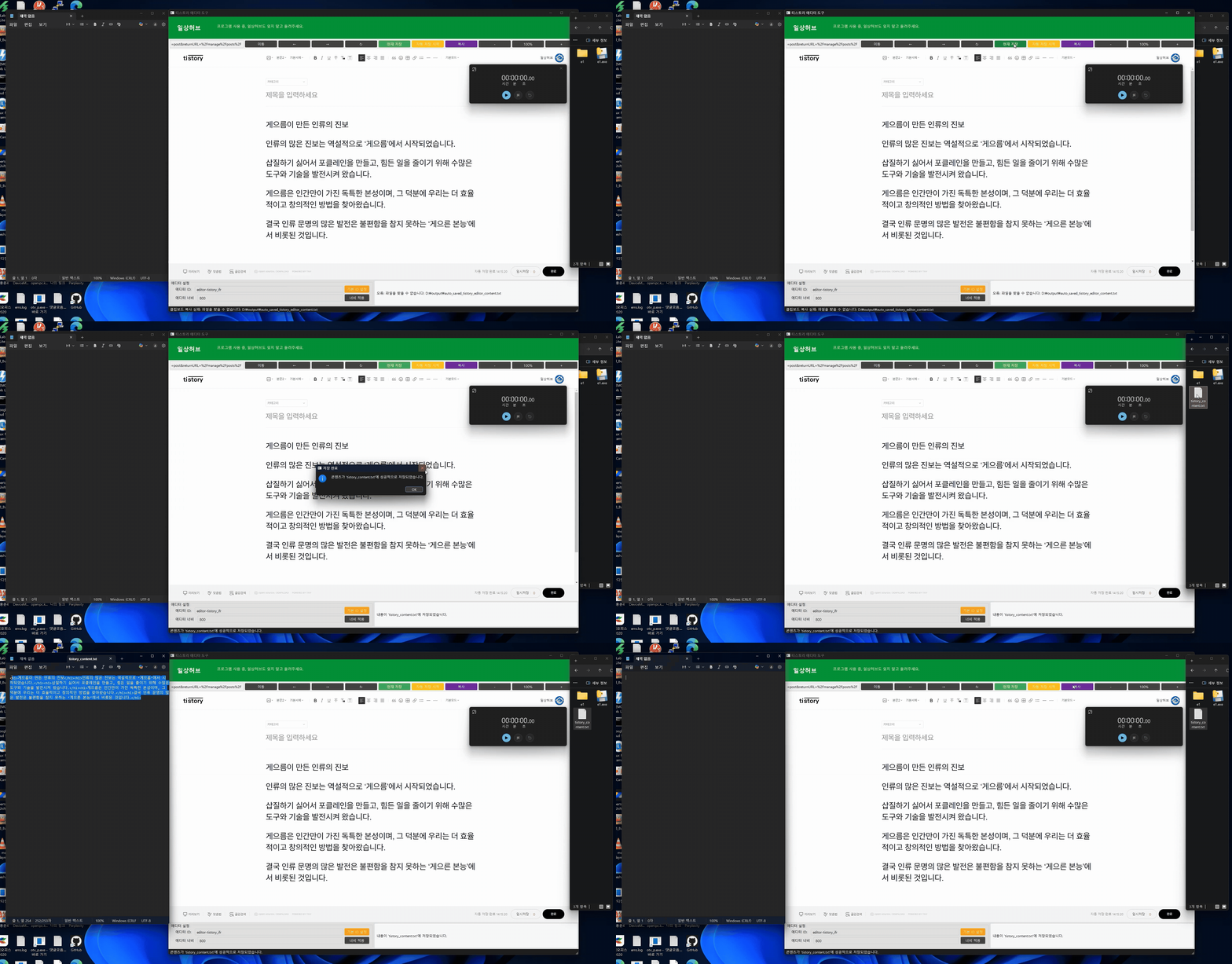
2. Auto Save (Real-Time Backup)
During content creation, it auto-saves every 10 seconds, ensuring work continuity as content can be quickly restored through the saved file even if it is deleted or lost while writing.
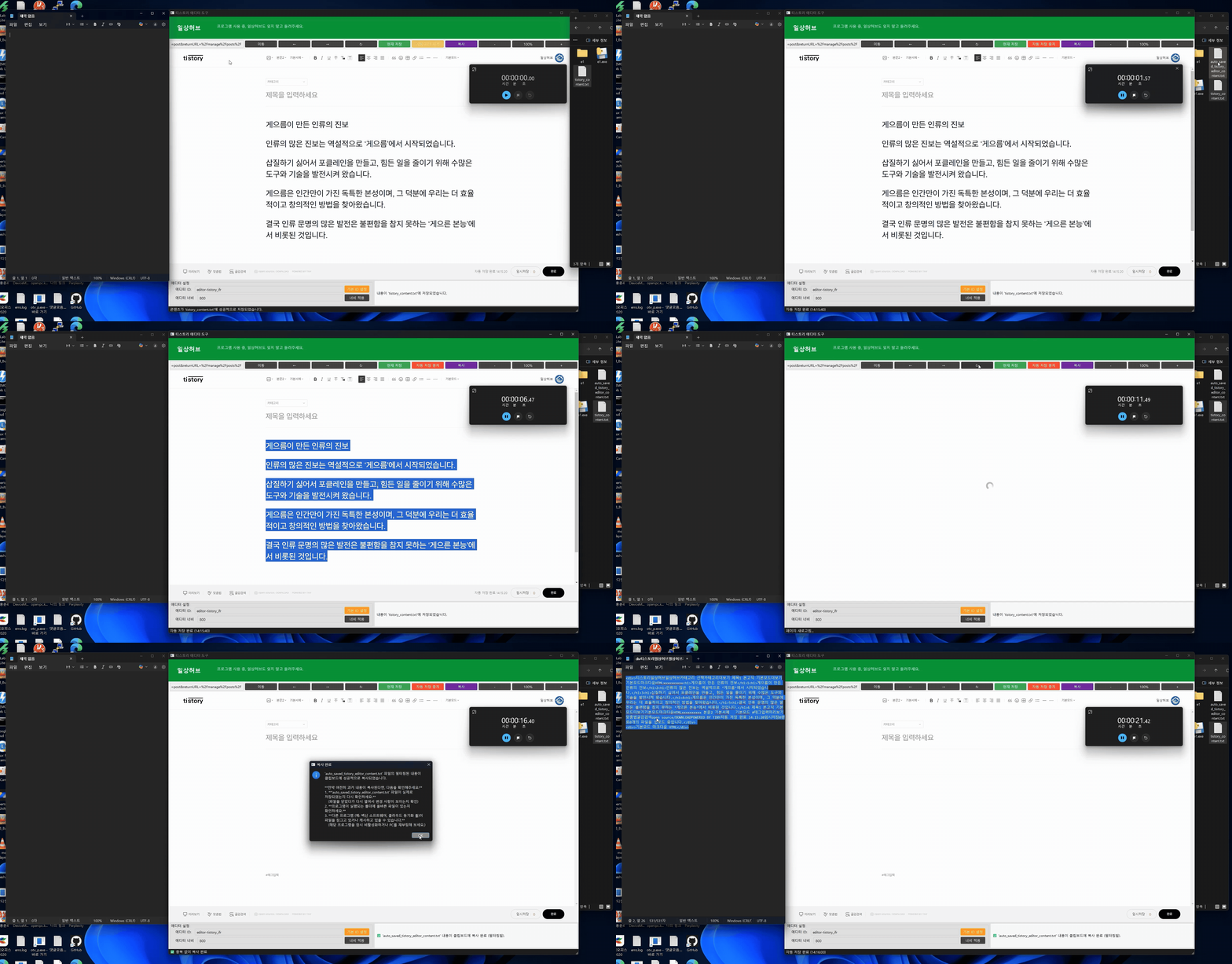
3. Copy Function (Clean Restore)
Removes unnecessary code (e.g., platform-specific attributes) from the saved backup file, allowing it to be copied cleanly and concisely for pasting into the blog editor.
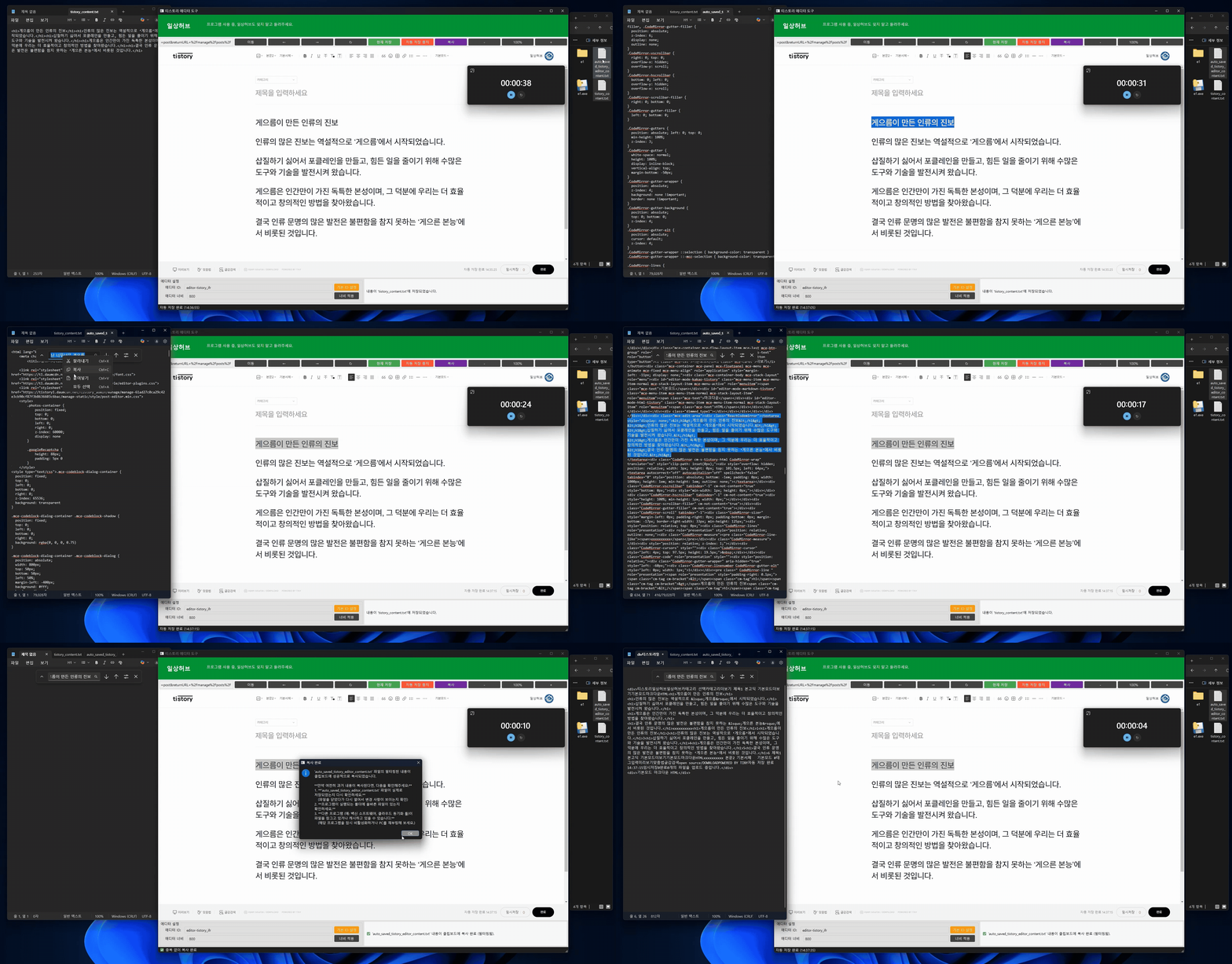
4. Editor Width Adjustment Function (Editing Environment Optimization)
Allows free adjustment of the editor's horizontal width during content creation to match the content to the accessing device environment. This enables accurate visual editing considering the final display environment.

(Summary of executable file usage order below)
- Run executable file or open HTML document
- Start typing the post
- Auto-saved every set interval
- Change editor width using the width adjustment bar or set value
- Previous post is saved to hard drive even if the page is closed and reopened
5. The Start of Safe and Efficient Content Creation
Blog content is not just writing. It is a creative work imbued with time, emotion, and thought. Use the auto-save and width adjustment functions now to avoid losing such valuable content in an instant. No more worrying about lost posts! Accurate content alignment for the screen is OK! If the program is useful, please visit often.
Related materials:
Blog Editor Auto Backup and Horizontal Width Adjustment Program .TistoryEditor.exe
Frequently Asked Questions (FAQ)
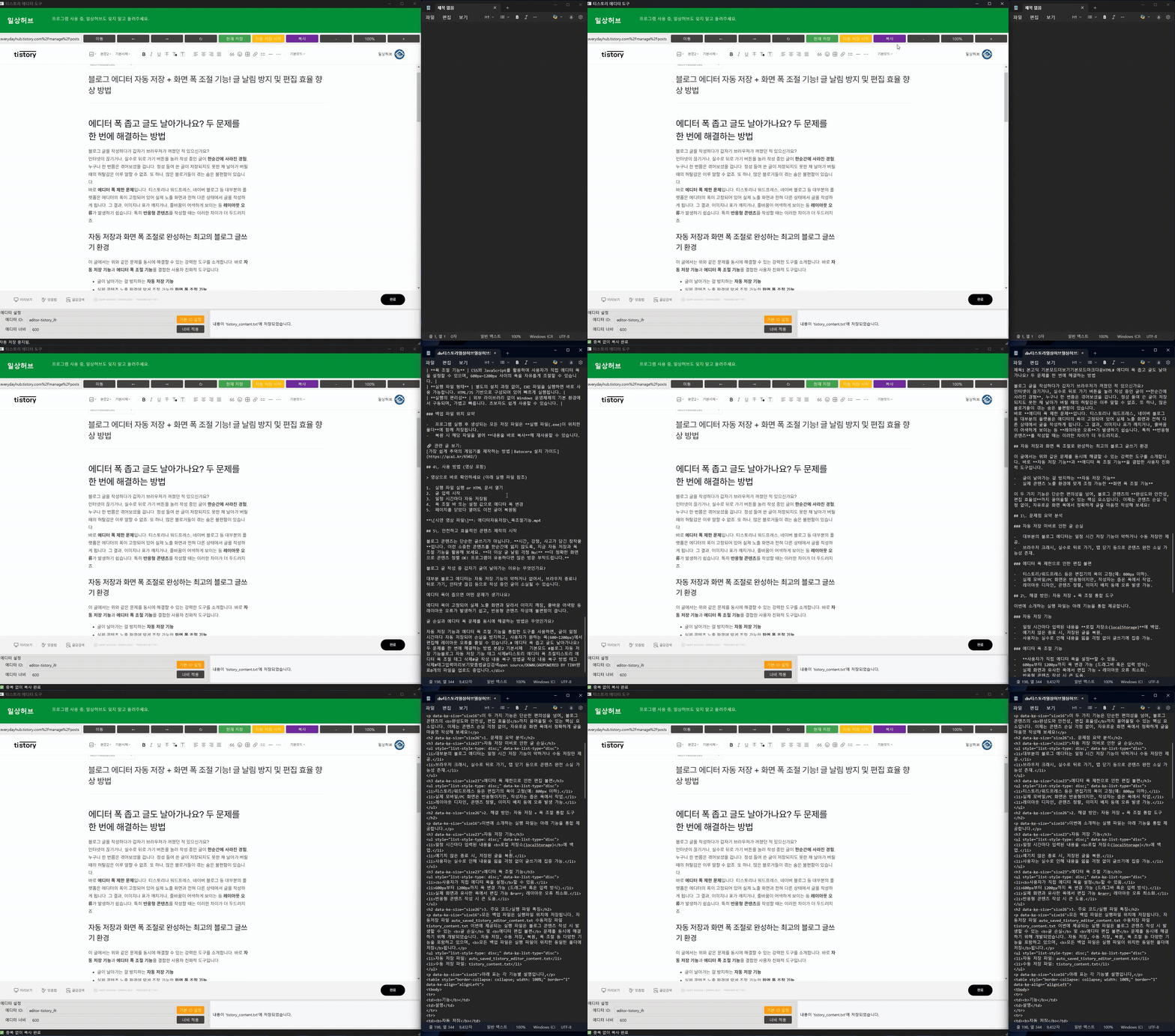
Why does the post suddenly disappear while writing a blog post?
Most blog editors have weak or no auto-save function, so the post being written can be lost due to browser closure, back button, or internet disconnection. This tool solves this problem through local storage backup.
What problems arise if the editor width is narrow, and why is it important?
If the editor width is fixed, it differs from the actual display screen, which easily causes layout errors such as image breaking or awkward line breaks, and causes great inconvenience when writing responsive content. This is directly related to the final user experience (UX) and indirectly affects SEO, making it important.
What is the method to solve the post loss and editor width problems simultaneously?
By using a tool that integrates the auto-save function and the editor width adjustment function, posts are automatically saved at regular intervals to prevent loss, and the user can edit in the desired width (10px to unlimited), maximizing editing efficiency and minimizing layout errors.