HowTo Rich Results Have Decreased, But Structuring Is Still Important
We re-examine the importance of HowTo structured data, a key strategy for blog SEO optimization, and explain why structuring should be maintained despite Google's policy to reduce Rich Results (E-E-A-T, indexing). We also guide you through the specific method of automatically generating JSON-LD using JavaScript on Tistory.
When operating a blog site and creating content, the importance of structured data in Search Engine Optimization (SEO) is often emphasized.Structuring cannot be stressed enough. This is because although content is ultimately for people, the role of exposing this content to search users and driving visits is handled by machines like search engines.
Tip for Blog Operators: Automating SEO with Structuring Scripts
In essence, structured data is the way a machine understands content. Creating content according to this means performing the most fundamental and essential task of helping search engines accurately recognize and evaluate your content. In particular, procedural content utilizing HowTo structured data for blogs had the effect of improving visitor visibility by being exposed as a rich snippet (preview) in the search results of major search engines.
JavaScript to Automatically Structure Procedural Content
This article explains in detail how to clearly write the step-by-step procedure titles using tags in the blog body and use JavaScript to automatically recognize them and convert them into JSON-LD formatted structured data.
This allows for the easy and automatic generation of HowTo data suitable for Search Engine Optimization (SEO) without complex coding, providing high satisfaction for both blog operators and visitors.
1. What is HowTo Structured Data?
HowTo structured data is a form of content using the _schema.org/HowTo_ format that clearly explains the steps for a user to follow to perform a task. Search engines like Google recognize this data and show a procedural preview in the search results. Through this, visitors could quickly grasp the key steps and methods, and blog operators could expect improved search visibility (increased CTR and enhanced SEO).
2. Why use this automation code?
- `h4` tag is a semantic heading tag, acting as an important step title for SEO.
- By attaching a specific class, the JavaScript is clearly distinguished to read only these tags.
- User experience (UX) is improved as each step title within the body becomes clear and easy for visitors to understand.
For example, if you want to explain the procedure for logging into the Tistory admin page, the title part is written as `h4 class="howto-step-title"1단계: 관리자 페이지 로그인/h4`, and a description is added below it, such as `p class="howto-step-desc"티스토리 관리자 페이지에 접속해 아이디와 비밀번호를 입력하여 로그인하세요./p`. By writing the title and description as a pair for each step in this manner, JavaScript can recognize this structure and automatically generate HowTo structured data in JSON-LD format.
Furthermore, ensuring each step title is independently clear and the description is specific provides positive effects for both Search Engine Optimization (SEO) and User Experience (UX). Content written with this structure decisively helps search engines accurately grasp the procedural nature of the content.
How to Apply the HowTo Structured Data Automatic Generation Code
1단계: 본문 콘텐츠에 클래스 적용
The provided script code below reads tags with the following classes in the blog body and automatically generates HowTo structured data in JSON-LD format:
- Overall Title: `h3 class="howto-title"`
- Introductory Text: `.howto-intro` class element
- Meta Information: Time, tools, supplies, etc. using `dt` and `dd` tags inside `.howto-meta-info`
- Step-by-step Sections: Each step grouped with the `.howto-step` class
- Step Title: Tag with the `.howto-step-title` class (e.g., `h4 class="howto-step-title"1단계: 로그인/h4`)
- Step Description: Tag with the `.howto-step-desc` class (e.g., `p class="howto-step-desc"관리자 페이지에 로그인합니다./p`)
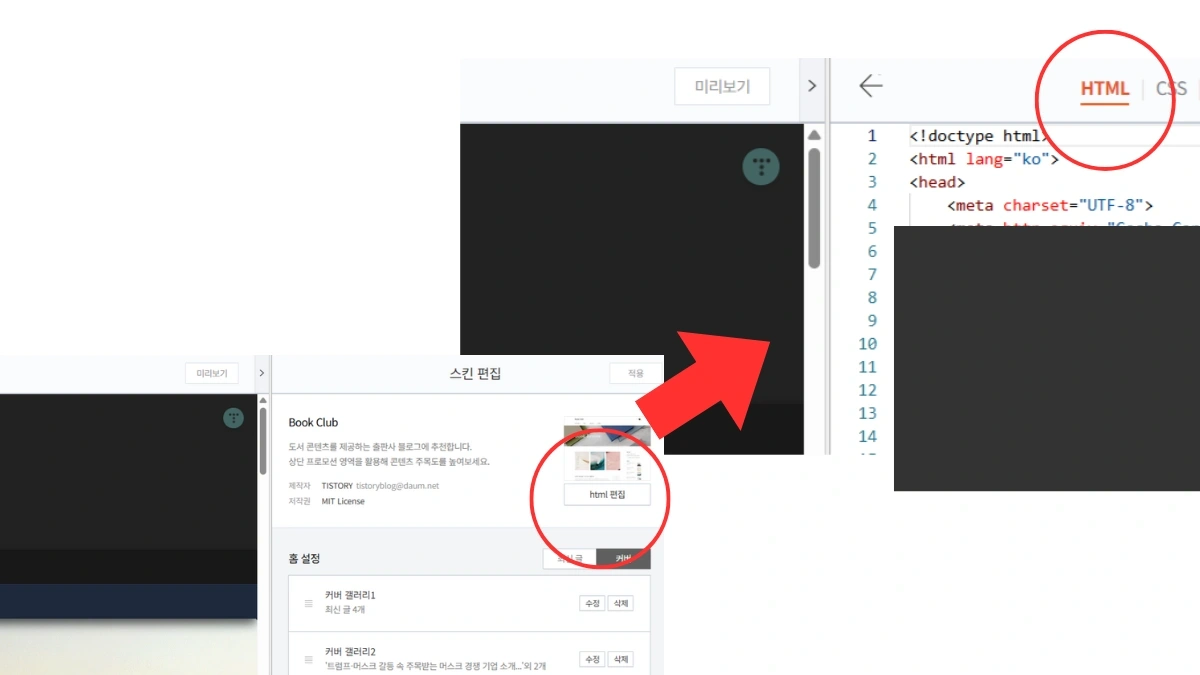
2단계: 자바스크립트 코드 스킨 편집에 삽입
Paste the copied JavaScript code right before the `/head` tag in the Tistory Skin Editor screen. Inserting it in this location allows the Google search engine to correctly recognize the structured data.
3단계: 단계별 콘텐츠 작성 예시
Write each step in the blog body as shown in the example below. The entire post is organized around the procedure, helping search engines accurately identify it and recognize it as a 'step-by-step guide card.'
h3 class="howto-title"Tistory Admin Page Usage Method/h3
p class="howto-intro"We guide you step-by-step from logging into the admin page to writing a post./p

div class="howto-step"
h4 class="howto-step-title"Step 1: Log in to the Admin Page/h4
p class="howto-step-desc"Access the Tistory admin page and log in by entering your ID and password./p
/div

div class="howto-step"
h4 class="howto-step-title"Step 2: Go to the New Post Writing Screen/h4
p class="howto-step-desc"Click the Write button in the admin menu to move to the new post writing screen./p
/div

!-- Repeat steps as needed --
4단계: HowTo 구조화 데이터 생성 확인
After writing and saving the blog page, enter your blog URL in the Google Rich Results Test to verify that the HowTo structured data is correctly generated. This is a fundamental step in SEO optimization.
추가 메타 정보 (선택적 HowTo 요소)
Adding total time, tools, and supplies information can enrich the HowTo schema. It can be written as follows:
dl class="howto-meta-info"
dtTotal Time/dtdd30 minutes/dd
dtTools/dtddComputer, Internet Browser/dd
dtSupplies/dtddTistory Account/dd
/dl| Tag | Role |
|---|---|
| dl | Signifies the start of a Definition List |
| dt | Definition Term (Title of the item to be defined) |
| dd | Definition Description or Value for that item |
Automatic Generation JavaScript Code
This code traverses the DOM to extract HowTo elements and dynamically inserts a valid JSON-LD into the `head` tag.
script
document.addEventListener('DOMContentLoaded', function() {
const existingSchema = document.querySelector('script[type="application/ld+json"][data-howto]');
if (existingSchema) existingSchema.remove();

const howtoTitle = document.querySelector('h3.howto-title')?.textContent.trim() || document.title;
const howtoDesc = document.querySelector('.howto-intro')?.textContent.trim() || '';

const metaInfo = document.querySelector('.howto-meta-info');
const getMetaValue = (labelText) = {
if (!metaInfo) return '';
const dtElements = metaInfo.querySelectorAll('dt');
for (const dt of dtElements) {
if (dt.textContent.trim().includes(labelText)) {
return dt.nextElementSibling?.textContent.trim() || '';
}
}
return '';
};

const totalTime = getMetaValue('소요 시간');
const tools = getMetaValue('도구');
const supplies = getMetaValue('재료');

const steps = Array.from(document.querySelectorAll('.howto-step')).map((step, index) = {
const name = step.querySelector('.howto-step-title')?.textContent.replace(/^\d+단계:\s*/, '').trim() || '';
const text = step.querySelector('.howto-step-desc')?.textContent.trim() || '';
return {
"@type": "HowToStep",
"name": name,
"text": text,
"position": index + 1
};
}).filter(step = step.name && step.text);

if (!howtoTitle || steps.length === 0) return;

const howToData = {
"@context": "https://schema.org",
"@type": "HowTo",
"name": howtoTitle,
"description": howtoDesc,
// totalTime is recommended to be converted to ISO 8601 format (PT#M), but is kept as a string here
...(totalTime && { "totalTime": "PT" + totalTime.replace(/(\d+)(분)/, '$1M') }),
...(tools && { "tool": tools.split(',').map(item = ({ "@type": "HowToTool", "name": item.trim() })) }),
...(supplies && { "supply": supplies.split(',').map(item = ({ "@type": "HowToSupply", "name": item.trim() })) }),
"step": steps
};

const script = document.createElement('script');
script.type = 'application/ld+json';
script.setAttribute('data-howto', 'true');
script.text = JSON.stringify(howToData, null, 2);
document.head.appendChild(script);
});
/script
Google Policy Change in 2023: Rich Result Reduction and the Enduring Value of Structuring
However, I found this information. I worked hard writing the article and creating the code, but...
HowTo schema markup itself is still valid, but the display of HowTo Rich Results (the visually emphasized step-by-step guide format) in Google search results has been significantly reduced or discontinued.
Summary of Google Changes in September 2023
- HowTo Rich Results Discontinued
Google has discontinued HowTo Rich Results even on desktop to simplify search results. It was previously discontinued on mobile. - FAQ Schema (Frequently Asked Questions)
FAQPage schema is now also more likely to be displayed as a Rich Result only for authoritative government and health-related websites. It has been changed to no longer regularly appear for typical blogs or general websites.
Reasons to Maintain Structuring Despite Rich Result Reduction
However, structured data still holds value. Although the visible rich results have decreased, it still enhances content understanding, the fundamental goal of search engine optimization.
1. Improved Search Engine Understanding and Indexing
Even if not directly exposed as a Rich Result, the HowTo schema helps Google clearly understand that the page contains 'how-to' content about what and how to do something. This can lead to improved search indexing and content classification accuracy. In other words, Google is more likely to understand the content more accurately and expose it to relevant search queries.
2. Preparation for Future Policy Changes
Google can change its policy at any time. Since it may reintroduce Rich Results for specific schemas in the future or utilize them in new ways, applying schema markup in advance is a form of preparation and a long-term SEO asset.
3. Strengthening E-E-A-T Signals (Expertise, Experience, Authoritativeness, Trustworthiness)
Structured data like HowTo or FAQ can indirectly contribute to strengthening the E-E-A-T signals of the content: Expertise, Experience, Authoritativeness, and Trustworthiness. This helps search engines judge the page as a more credible source of information.
Although the reduction in rich results is disappointing, applying structured markup itself is not meaningless. HowTo and FAQ structured data remain a meaningful strategy in terms of Search Engine Optimization (SEO), User Experience (UX), and future scalability.
Even if rich results do not appear now, structured content design and code application are clearly a long-term SEO asset.
Frequently Asked Questions (FAQ)
Why is structured data important for blog SEO?
Structured data is a format that helps search engines mechanically understand 'what the article is about.' Applying the HowTo schema, in particular, could previously increase click-through rates (CTR) and search visibility by being displayed as a step-by-step guide card in search results. Even after the reduction in rich results, it improves content understanding, increasing indexing accuracy.
What are the advantages of automatically generating structured data using JavaScript?
By simply specifying certain classes on the h4 and p tags in the body, JavaScript reads them and automatically generates HowTo structured data in JSON-LD format. The advantage is that you can benefit from SEO without complex coding, and the structured data is updated along with content revisions, making management efficiency very high.
Does Google no longer display HowTo rich snippets?
Since September 2023, Google has largely discontinued HowTo rich results in mobile and desktop search results. However, the structured data itself still holds high value as a long-term SEO asset for improving content classification accuracy, indexing, and preparing for future policy changes.