How to Boost Blog Search Ranking with FAQ Structured Data (JSON-LD Automatic Generation)
Introducing the JavaScript code and application method for automatically generating FAQ structured data (JSON-LD) to increase blog visibility. This automated SEO strategy effectively boosts Click-Through Rate (CTR) and search ranking by exposing Rich Results (collapsible Q&A) in Google search results.
As the AI-based search environment rapidly changes, blog SEO strategies are entering a new phase. Among these, Question and Answer (FAQ) format content is no longer a simple choice but has emerged as an essential content type optimized for the AI search era. Search users increasingly prefer to reach the information they want immediately rather than reading long articles individually, which is why the Frequently Asked Questions format (FAQ) is effective for targeting high-intent Long-tail Keyword searches.
But what if we take this a step further and provide this FAQ in Structured Data (JSON-LD) format? Search engines like Google recognize this structured data and display the content in search results as collapsible Q&A (FAQ Rich Results). This is a way to achieve both improved search Click-Through Rate (CTR) and increased visibility within search results simultaneously, going beyond mere information provision.
How to Automatically Convert Blog Questions and Answers into Structured Data
This article introduces JavaScript code that automatically converts FAQ content into JSON-LD structured data on Tistory blogs or general websites. You can achieve the **SEO effect of automatic reflection in Google FAQ Rich Results** with just a line of code, without separately converting the Q&A written in the blog body. Upgrade your blog one step further into a search engine-friendly platform by automatically inserting structured data without complex settings, boosting your general Keyword performance.
Explanation and Importance of FAQ Question and Answer Structured Data
FAQ structured data is information specially marked so that search engines can easily understand the questions and answers within a webpage. It is mainly written in JSON-LD format and displayed as a collapsible Q&A box (FAQ Rich Result) in Google search results. This feature allows users to solve their queries directly from the search result, and it gives blog operators an advantage in exposure, securing higher visibility compared to competing blogs, especially for Related Keyword queries.
Why Should Question and Answer Structured Data Be Automatically Generated on a Blog? (Maximizing SEO Efficiency)
- Efficiency: Manually creating structured data for the FAQ in every blog post is time-consuming and difficult to manage. Automatic generation relieves this burden.
- Consistency: Prevents typos or omissions that can occur with manual entry and applies a standardized SEO format to all pages.
- SEO Optimization: Complies with the latest SEO guidelines, increasing the probability of exposure as Rich Results in Google search results, which is vital for any Keyword strategy.
- User Experience (UX) Enhancement: The display of collapsible Q&A boosts visitor Click-Through Rate (CTR), generating a positive signal for search engines.
- Technical Advantage: Since the JSON-LD method is inserted separately from the HTML content, it does not affect the webpage's loading speed or existing HTML structure.
Introduction and Application of the Automatic Q&A FAQ JSON-LD Generation Script
See related articles:
Automatic Q&A Code Generator
The code below is a JavaScript-based client-side automation script that reads the FAQ content written with questions and answers within the HTML document and automatically generates and inserts the JSON-LD structured data into the head. Using this script completes SEO optimization just by writing the post, especially for Long-tail Keyword content.
JSON-LD Automatic Generation Script Insertion Location
Now, paste the JavaScript code below immediately above </head> or </body> in the Tistory Skin Editor > HTML Edit screen. This script maps the questions and answers based on the class name of the FAQ content.
This script file performs the following functions:
This script recognizes the pair of faq-question and faq-answer classes and automatically generates and inserts the FAQ structured data into the head.
Styling Questions and Answers (UX Improvement)
If you want to make your FAQ content stand out and improve readability, add the CSS code below to the skin's CSS editing area. This helps increase visitor dwell time by improving the User Experience (UX).
Dark Mode Skin CSS (Improved Readability)
.faq-question {
 font-family: 'Pretendard', -apple-system, BlinkMacSystemFont, sans-serif;
 font-weight: 600;
 font-size: 1.1rem;
 color: #e0e0e0;
 background-color: #1e1e1e;
 padding: 1.2rem 1.5rem;
 border-radius: 8px;
 margin: 0.8rem 0 0 0;
 cursor: pointer;
 transition: all 0.3s cubic-bezier(0.4, 0, 0.2, 1);
 border-left: 4px solid #3a3a3a;
 box-shadow: 0 1px 3px rgba(0, 0, 0, 0.2);
}

.faq-question:hover {
 background-color: #252525;
 border-left-color: #5d5dff;
 transform: translateX(4px);
}

.faq-answer {
 font-family: 'Pretendard', -apple-system, BlinkMacSystemFont, sans-serif;
 font-weight: 400;
 font-size: 1rem;
 line-height: 1.6;
 color: #b0b0b0;
 background-color: #252525;
 padding: 1.5rem;
 border-radius: 0 0 8px 8px;
 margin: 0 0 1rem 0;
 border-left: 4px solid #3a3a3a;
 animation: fadeIn 0.3s ease-out;
}

@keyframes fadeIn {
 from { opacity: 0; transform: translateY(-10px); }
 to { opacity: 1; transform: translateY(0); }
}

/* Media query for dark mode support */
@media (prefers-color-scheme: dark) {
 .faq-question {
 background-color: #1a1a1a;
 }
 .faq-answer {
 background-color: #222222;
 }
}
Light Mode CSS (Clean Design)
.faq-question {
 font-family: 'Pretendard', -apple-system, BlinkMacSystemFont, sans-serif;
 font-weight: 600;
 font-size: 1.1rem;
 color: #333333; /* Dark text */
 background-color: #ffffff; /* White background */
 padding: 1.2rem 1.5rem;
 border-radius: 8px;
 margin: 0.8rem 0 0 0;
 cursor: pointer;
 transition: all 0.3s cubic-bezier(0.4, 0, 0.2, 1);
 border-left: 4px solid #e0e0e0; /* Light gray border */
 box-shadow: 0 1px 3px rgba(0, 0, 0, 0.08); /* Lighter shadow */
}

.faq-question:hover {
 background-color: #f8f8f8; /* Subtle gray background on hover */
 border-left-color: #5d5dff; /* Blue accent */
 transform: translateX(4px);
}

.faq-answer {
 font-family: 'Pretendard', -apple-system, BlinkMacSystemFont, sans-serif;
 font-weight: 400;
 font-size: 1rem;
 line-height: 1.6;
 color: #555555; /* Medium tone text */
 background-color: #f9f9f9; /* Light gray background */
 padding: 1.5rem;
 border-radius: 0 0 8px 8px;
 margin: 0 0 1rem 0;
 border-left: 4px solid #e0e0e0;
 animation: fadeIn 0.3s ease-out;
}

@keyframes fadeIn {
 from { opacity: 0; transform: translateY(-10px); }
 to { opacity: 1; transform: translateY(0); }
}
How to Write FAQs and Verify Automatic Reflection
In the Tistory writing screen, write the questions and answers with the structure below. The script automatically recognizes these div tags and generates structured data.
<div class="faq-question">How should I write the blog title?</div>
<div class="faq-answer">It is recommended to place the core keyword at the beginning and write it clearly.</div>
<div class="faq-question">Why is the image Alt tag important?</div>
<div class="faq-answer">Because it helps search engines understand the image and increases exposure potential.</div>
Caution: The class names of the div must be exactly faq-question and faq-answer.
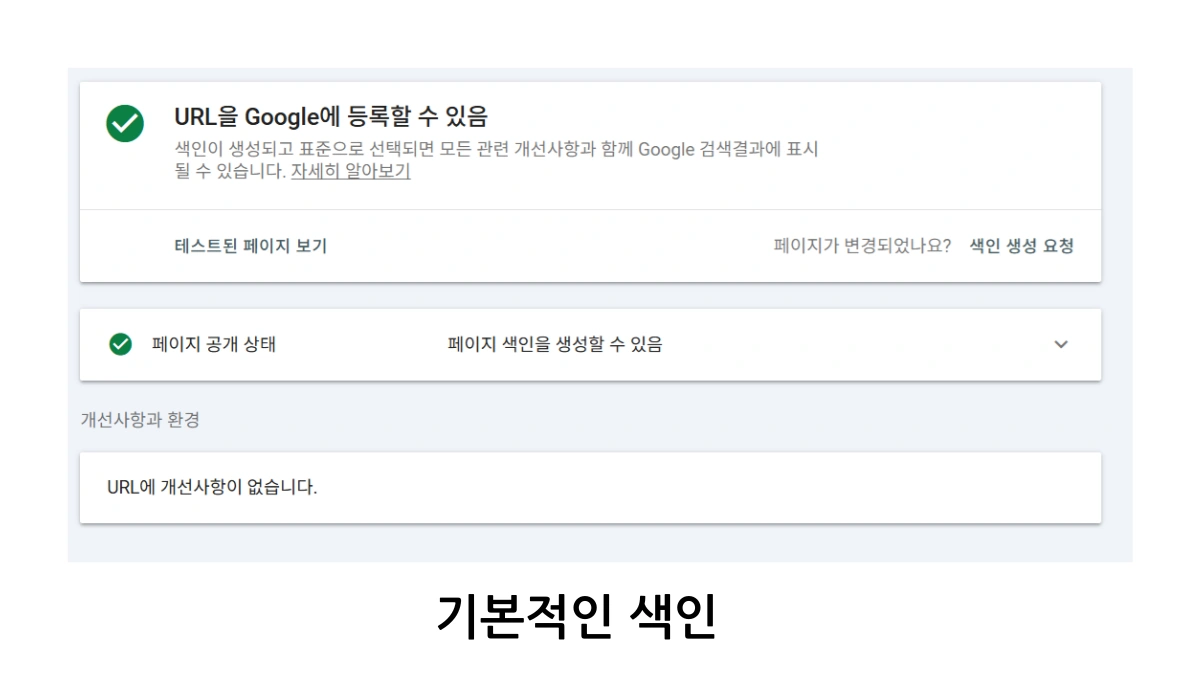
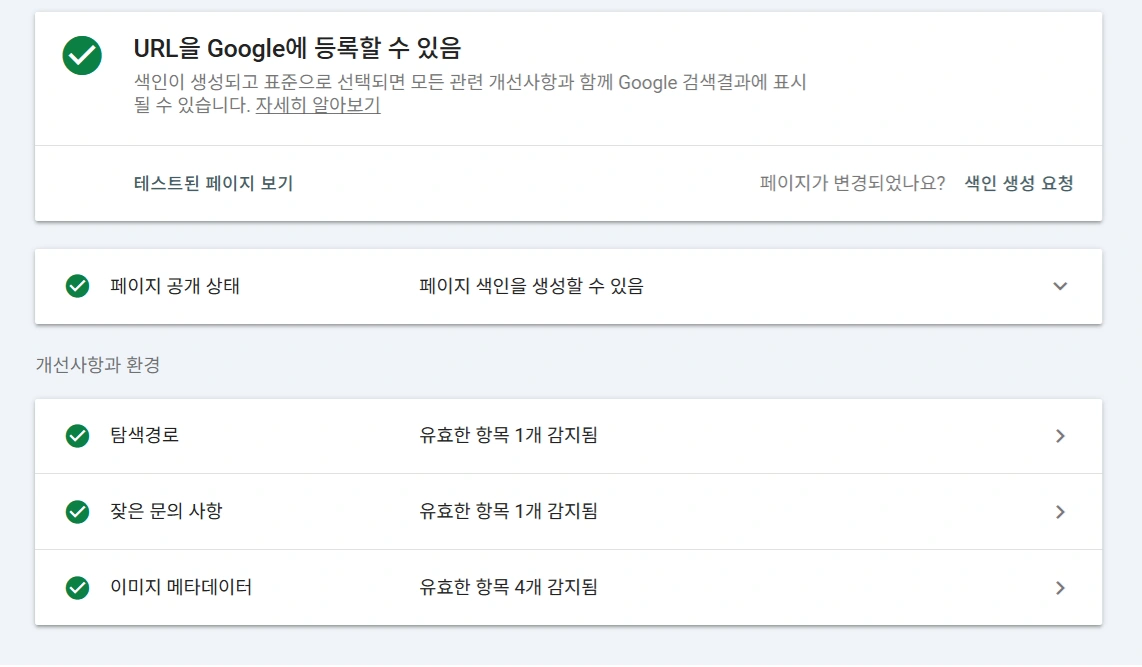
How to Verify Automatic Reflection (Validation Process)
After posting the blog article, you can enter the article URL into the Google Structured Data Testing Tool to check if the automatically generated JSON-LD is properly reflected. If the rich result is successfully detected, you can monitor the exposure status through the FAQ Rich Result report in Google Search Console, essential for Related Keyword monitoring.
Automatic Q&A Code Generator
This FAQ tag automatic generator is a tool that quickly and easily creates Frequently Asked Questions (FAQ) content in HTML tag format for Tistory or general blogs. Usage is very simple.
First, there are 5 sets of input fields prepared, each providing a question and its answer. Enter the question and answer content you wish to write in each input field. Then, press the code generation button, and the entered questions and answers will be automatically converted into HTML code in the form of <div class="faq-question">Question</div> and <div class="faq-answer">Answer</div>, displayed in the output field below.
The generated code can be saved to the clipboard by pressing the copy button, and all input fields and output content can be cleared at once by pressing the reset button. By pasting this code into the Tistory blog body or skin editor, you can easily create effective structured FAQ content for both visitors and search engines, particularly effective for Long-tail Keyword captures.
What is FAQ Structured Data (JSON-LD)? (Core Definition)
It is data marked in a special format to help search engines easily understand the questions and answers within a webpage, and it is exposed as a collapsible Q&A box (Rich Result) in Google search results. This uses the **Schema.org's FAQPage markup**.
Why is FAQ structured data automatically generated? (SEO Benefits)
Automatic generation is effective because it prevents the inconvenience, typos, and omissions of manual entry, aligns with the latest SEO optimization, and indirectly improves search ranking by increasing visitor Click-Through Rate (CTR) for relevant **Keywords**.
How do I automatically apply FAQ structured data to a Tistory blog? (Application Method)
Write the questions and answers using <div class="faq-question"> and <div class="faq-answer"> respectively, and insert the provided JavaScript code immediately before </head> or </body> in the skin editor. This automatically generates and sends the JSON-LD to Google, helping with **Related Keyword** visibility.
How do I check if the automatically generated FAQ structured data is properly reflected? (Validation Tool)
After posting the blog, you can input the URL into the Google Structured Data Testing Tool to verify if the FAQPage type JSON-LD has been correctly generated, and you should regularly check the Rich Results report in Google Search Console.
Frequently Asked Questions Related to FAQ Structured Data
Are there any SEO principles to be aware of when automatically generating JSON-LD?
The most important rule is that the FAQ content must be directly related to the topic of the page, and the questions and answers should not be too long or contain promotional content. Also, the class names (faq-question, faq-answer) must be used consistently so that the script can accurately recognize all question and answer pairs, which is vital for any **Keyword** structure.
Why are the automatically generated FAQ Rich Results not immediately exposed in search results?
Rich Result exposure is determined by Google's policy and algorithm. Even if the structured data is valid, it will only be exposed if Google deems the content useful to the user. A crawling and indexing process is usually required, and non-exposure may be due to content quality, trustworthiness, or Google's exposure policy, affecting the search for relevant **Long-tail Keyword** phrases.
Does using JSON-LD structured data slow down the blog's page loading speed?
JSON-LD is a general text-based script, so its impact on page loading speed is minimal. Especially the method of dynamic insertion using JavaScript does not interfere with the rendering of the content itself, thus having almost no negative impact on the Core Web Vitals score.